The good news first: The Application Process Engine (APE) is not only powerful but also user-friendly. Anyone who wants to control, monitor, or initiate processes does not need to be a developer. With a little basic understanding, you can quickly get started. APE helps to map processes efficiently. In this blog post, I will show you how APE works and what basics you need to operate it safely and confidently. The focus is particularly on S/4HANA Utilities.
What is the APE Framework?
The Application Process Engine (APE) framework offers a modular system with which adaptive and rule-based processes can be modeled, monitored, managed, and executed.
Processes can react to real-time data and change dynamically based on rules or conditions. This depends on how the process steps are defined and how logical connections between the steps have been established (e.g., during a supplier change). Further processes or sub-processes can also be initiated.
This means that business processes can be executed and defined as workflow models. In addition, specific processes or actions in connected peripheral systems can be triggered via defined interfaces. How this exchange is technically enabled and what role the Business System and the SAP MaCo (Market Communication) Cloud play will be explained in more detail in the next section.
In the case of S/4HANA Utilities, SAP delivers and updates the regulatory mandatory processes for format changes. Market communication refers to the legally regulated data exchange between market participants (e.g., supplier, grid operator, metering point operator). Since market messages are sent via the MaCo Cloud, a large part of the adaptation effort for market participants is eliminated. The MaCo Cloud is designed as a public solution in the SaaS model (Software as a Service) and standardizes central functions. APE helps to map these processes efficiently. This applies to the semi-annual
Advantages
- High flexibility: Processes can be dynamically changed, and the prerequisites for the process sequence can be precisely defined and stored.
- Clear status and flow: Process flows are displayed in real-time, and erroneous processes can be specifically viewed and, if necessary, corrected.
- Reusability of processes: Sub-processes can be configured and reused in other processes.
- Automation: The processes run automatically. In case of errors or clarification needs, manual intervention is possible, and the appropriate solution can be selected.
- Integration of peripheral systems: Through defined interfaces, peripheral systems (e.g., market communication solutions like MaCo Cloud) can be directly controlled.
- User-centric operation (Fiori): Thanks to Fiori UI Services, APE offers user-friendly, browser-based interfaces for business and IT users.
How is APE Technically Implemented?
APE is used both across the Business System (e.g., SAP S/4HANA) and in the Market Communication System (MaCo Cloud). The foundation of APE is the RESTful ABAP Programming Model, a modern development approach in SAP for creating lean, service-based applications. Furthermore, Fiori UI Services, user-friendly, web-based interfaces that enable easy access via the browser, are provided.
The communication between these two systems is controlled by two document types:
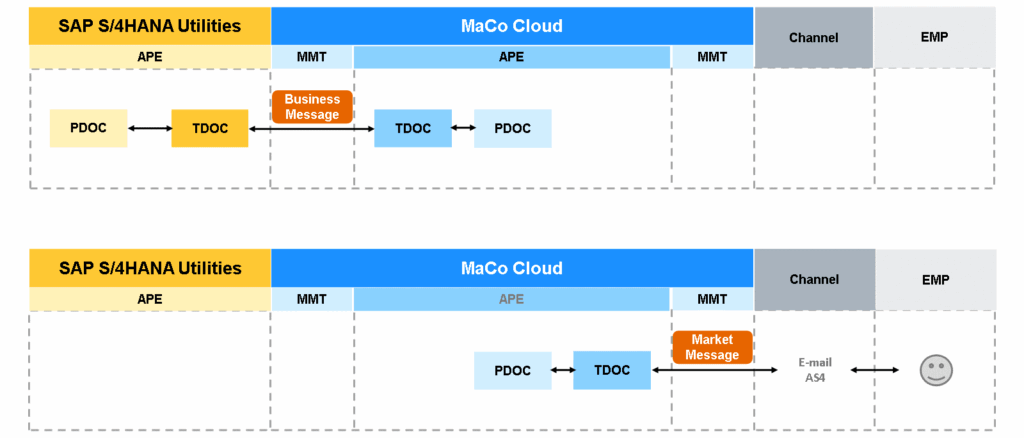
The graphic illustrates the various systems (SAP S/4HANA Utilities and MaCo Cloud) with the APE framework and document types Process Document (PDOC) and Transfer Document (TDOC). This controls the information and message exchange between MaCo Cloud and S/4HANA.
- Process Document (PDOC): Describes the progress of the process
- Transfer Document (TDOC): Contains the message to another system (EDIFACTS are represented as TDOC with payload)
These documents are displayed on the Fiori interface and form the basis for process documentation and monitoring. The documents just described can be found in so-called “apps” on the Fiori interface. There are various apps for different ways to monitor and control processes.
Which Apps Monitor and Control the Process?
In transfer, process, and exception documents, processes and their interaction between different systems can be observed and, if necessary, intervened in.
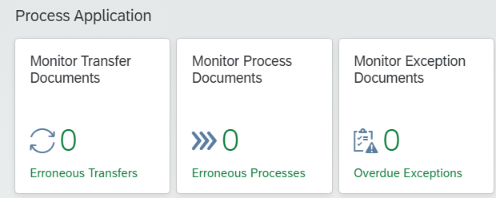
In the “Monitor Process Documents” app, the process flow is documented. Every started process creates a PDOC, where any information such as market location, metering location, or business partner can be displayed. The process document maps the current process flow in real-time and is uniquely identifiable via a document number and a common access reference. The common access reference (engl. Common Access Reference) links all process documents belonging to a coherent process flow – including any transfer documents – and is indispensable for the analysis and search of PDOCs.
The “Monitor Transfer Documents” app represents the communication between external systems and the MaCo Cloud. When a message transfer occurs, a unique transfer document is created, which is identified by a unique document number and the common access reference.
How are Situations Handled where a Process Document is Stopped Due to an Error?
Possible causes include faulty code, manual interventions, or necessary user actions. For this purpose, the “Monitor Exception Documents” app is available. Exception documents are always created when a process encounters an error or a user decision is required at a certain point. These decisions can include various options that were previously configured in APE and, if necessary, individually programmed in ABAP. This allows, for example, process steps to be re-initiated, the PDOC to be completed, or market messages to be resent.
For the structured processing of such process interruptions, APE relies on the proven BPEM Framework (Business Process Exception Management). This enables transparent and standardized handling of exceptions, including escalations, resumptions, and user decisions – a central element for stable and traceable process management.
Conclusion
The Application Process Engine (APE) enables energy suppliers to map business processes flexibly within the SAP landscape. Furthermore, APE is designed to efficiently control and automate business processes. Customers have the option to configure their own processes or undertake individual implementations. Real-time monitoring is carried out via process and transfer documents, thereby ensuring consistent, transparent, and complete traceability of all processes.