Cloud solutions are becoming increasingly attractive. They are gradually conquering the market and displacing existing on-premise applications. This is also true in the financial services sector, where SAP is increasingly positioning its cloud application “SAP Analytics Cloud” (SAC for short) as a central platform for reporting and planning, and, through its integration into the SAP Datasphere, is also signaling long-term development and maintenance security. The following article explains the requirements and implementation of a profit and loss (P&L) planning system that we successfully implemented at an insurance company as part of an S/4 transformation project.
What was the starting point?
The central requirement for integrated profit and loss planning was the coverage of the following planning areas:
- Premium planning (insurance premiums received)
- Performance planning (payments made to customers)
- Provision planning (provision for services to be rendered)
- Reinsurance planning
- Investment planning
- Cost center planning (material and personnel costs)
- Investment planning
- Project cost planning
- Commission planning
- Tax planning
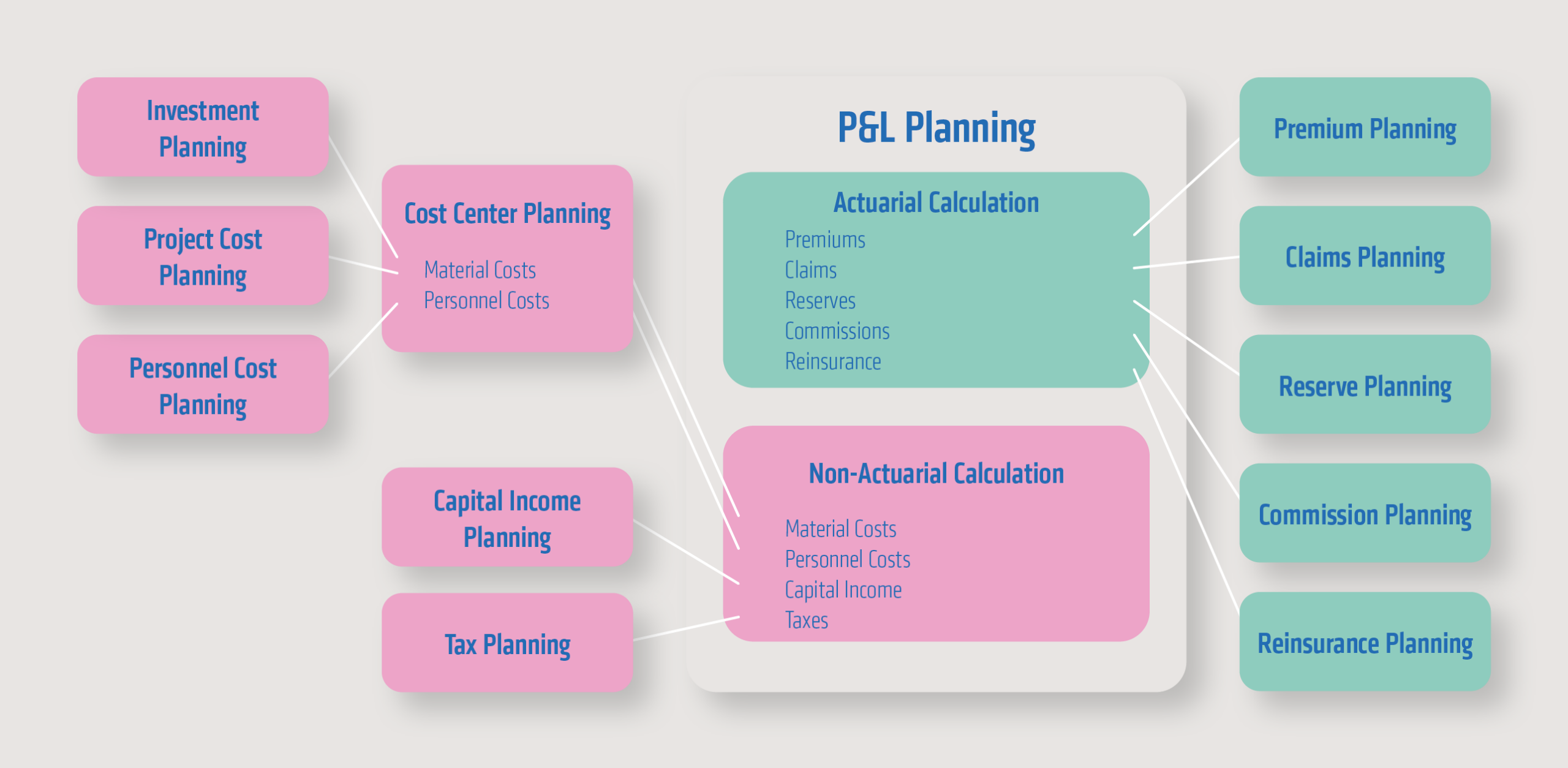
The goal was to enable the uploading, direct input, and editing of planning data for the listed planning areas. For some of the listed areas, an external planning application already existed, and its data delivery to the SAC (Strategic Accounting Center) was to be covered. Furthermore, it was specifically required that the insurance-specific planning areas be segmented (life, property/casualty, and health insurance). Insurance-specific breakdown characteristics (e.g., line of business, product groups) were incorporated into the premium planning.
After planning has been carried out, the result should be written back to the S/4 system with the necessary additional accounting entries, taking into account the necessary reporting and notification requirements (EU, Austrian Financial Market Authority).
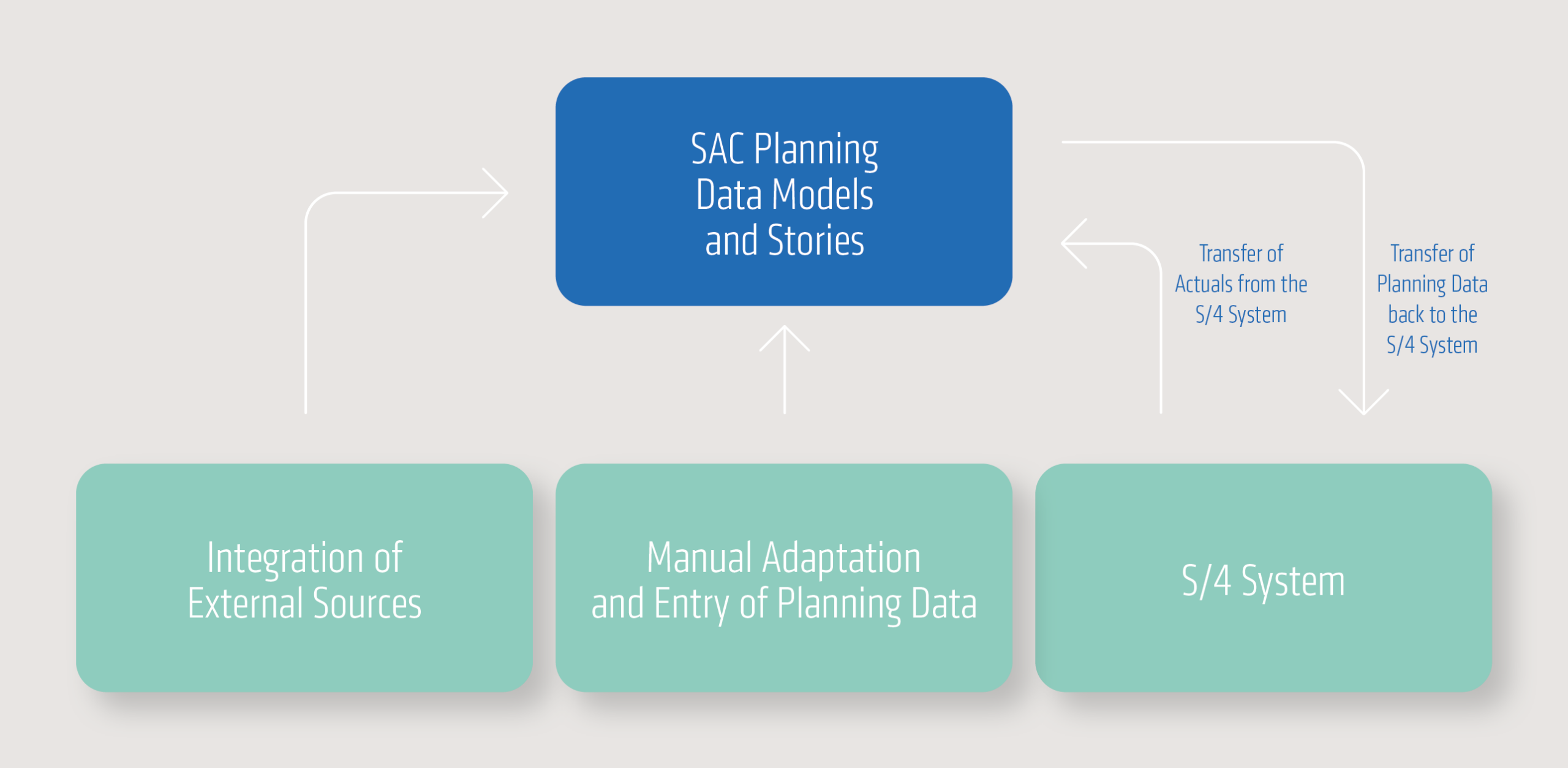
What were the challenges?
Workshop-based analysis
In the workshop-based analysis of customer requirements, each of the aforementioned planning areas was discussed, defined at the field level, and analyzed and documented with regard to specific requirements. A particular challenge was to integrate the different requirements of quarterly-based forecast planning for the next planning year and multi-year planning for the next five years into a single solution.
As part of the workshop series, it was also defined that, in addition to establishing the insurance-related planning areas, investment and project cost planning should be implemented, which was successfully realized based on SAC Business Content. SAC offers a core function of a workflow that allows different planning areas to be causally interdependent and informs the respective users about the status of the previous planning step via message. This function was implemented using a prototype and enables the company to manage its overall status.
Defining the necessary data models
Another challenge was defining the necessary data models as a basis for the planning areas mentioned above. Methodically, the field lists for each data model were compared to define the minimum number of planning areas required. The goal was to minimize maintenance efforts and loading runs.
To ensure efficient implementation, a reference story and a reference model were created. These served as templates for the other planning areas and were copied using a template-based approach. Finally, they were adapted to the requirements of each planning area, including the scripts used.
Early phase of implementation
Early in the implementation phase, it became clear that the solution also required a high degree of flexibility in the accounts to be planned. On the client side, different accounts and cost centers were relevant for planning, depending on the company code. Furthermore, these also needed to be differentiated according to the planning areas and insurance segments (life, health, property & casualty) and displayed differently in the respective planning areas. A user-friendly solution was implemented that allows users to adapt the system themselves without further IT support.
Further challenges
The import of master and transaction data from the S/4 system was implemented using CDS views. These were composed as follows:
- Standard-CDS Views
- Adapted or extended CDS Views
- Proprietary CDS Views
For data extraction and reporting in the S/4 system, the necessary annotations of the respective CDS views were taken into account.
Based on the analysis of the authorization requirements, an authorization matrix was defined that compared the corresponding authorizations in the SAC to the business role, taking into account planning areas, company code authorizations and central functions such as the return of data to the S/4 system.
Investment planning was based on SAC business content and included a standard SAP process for WBS element-based planning and any depreciation of investments after activation over their useful life. The SAP-defined process involves entering the planned values into SAC, writing the values back to the S/4 system, and using the standard depreciation runs. The resulting planned depreciation is then transferred back to SAC and reported via a SAC story.
The restoration of planning data to the S/4 system (ACDOCP) was performed via an export job (SAC standard function). A key challenge here was restoring the data in a version-dependent manner, without having to create new jobs for each new version (as would be required by the SAC standard). This was solved using a technical workaround to enable maintenance-free restoration.
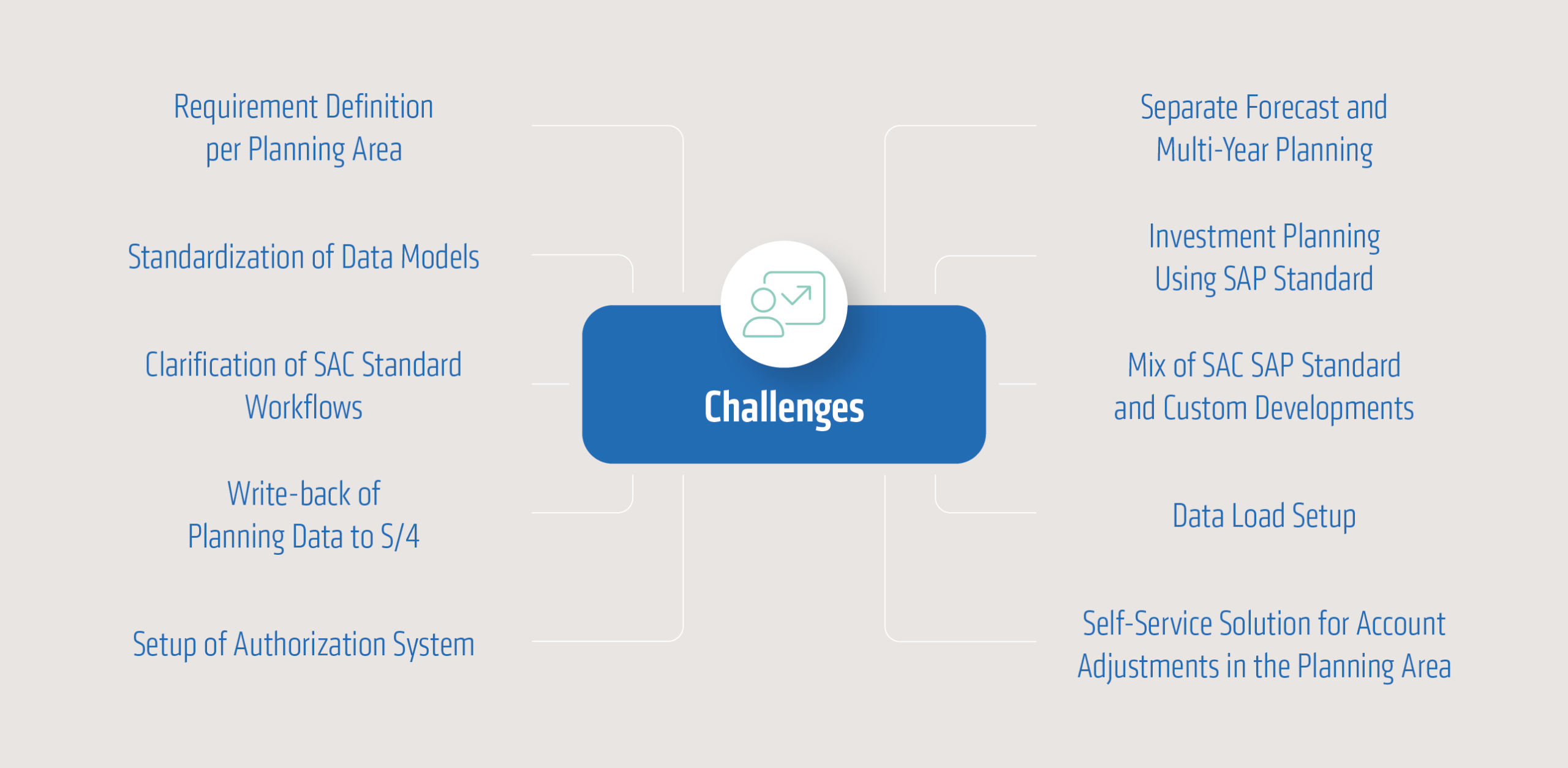
Validate solution approaches using “Proof of Concept”
To test the functionality of the solutions found for the challenges mentioned above, a proof-of-concept phase was conducted prior to the actual implementation. Specifically, the following functions were tested:
- Structure of the planning area “Premium Planning”
- Integration of actuals from the S/4 system
- Integration of planning data from external systems
- Input and adjustments of planning data in the SAC
- Data playback back into S/4 with the necessary granularity
- Investment planning using SAP standard recommendations in SAC and S/4
The result of this phase was the finding that the basic functions are achievable, but in some cases additional implementations are necessary, for example for feeding the data back into the S/4 system.
Landing page as the central access point to the application
With the division into twelve planning areas and the further differentiation into insurance segments (life, health, property/casualty), a key question arose regarding user-friendliness. How does the user find the appropriate planning layout in the SAC? How does the user recognize the status of individual data reports?
To increase user acceptance, a landing page was designed that immediately displays the key planning areas and their status. This meant that users had to enter the planning version and the relevant time period upon entry. This allowed users to determine the corresponding status of their planning entries.
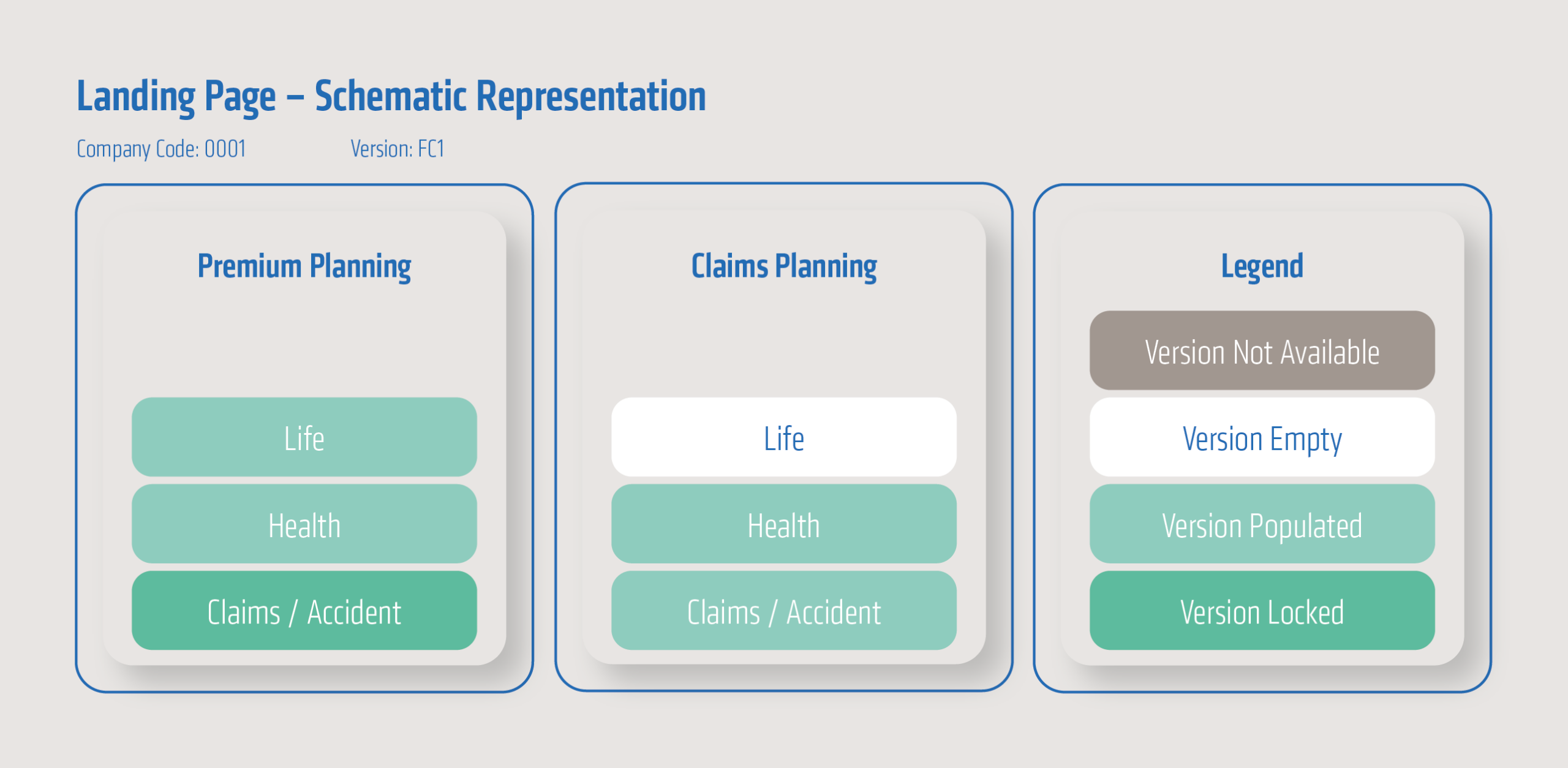
As shown in the diagram, the individual sub-areas are represented by rectangles. After selecting the version and company code, the corresponding status is displayed in color (see legend).
Success factors and conclusion
Following the go-live of the first accounting unit, it can be stated that the implementation of profit and loss planning using SAC represents a further step in the successful implementation of cloud-based solutions.
Central to the project’s success, alongside the detailed analysis and documentation of requirements, is the identification and resolution of interface issues that arise from crossing system boundaries between the S/4 system, SAC, and user data input. The data validation necessitated by this, among other things, ensures data quality in live operation and helps in the early detection and correction of data errors.
Das Rückspielen der Plan-Daten von der SAC in das S/4-System ermöglicht eine vollumfängliche Plan-GuV-Darstellung und festigt das S/4-System als Datenbasis für operative und strategische Reporting-Fragestellungen (single point of truth).