In the dynamic world of energy supply, process automation plays a crucial role in ensuring efficiency and accuracy in market communication. A key component of this system is the Common Layer in IS-U, which not only ensures automated process flows but also enables smooth data exchange and seamless data processing between market participants.
In this article, we will take a look at configuring customer-specific processes and how to intervene in process flows in a targeted manner.
Process documents, or as we call them: PDocs
Processes are tracked via process documents. A process document describes and documents the flow of business processes in utility companies. It serves as a guideline or template to record the exact sequence of a process, including the steps involved, responsibilities, and system settings.
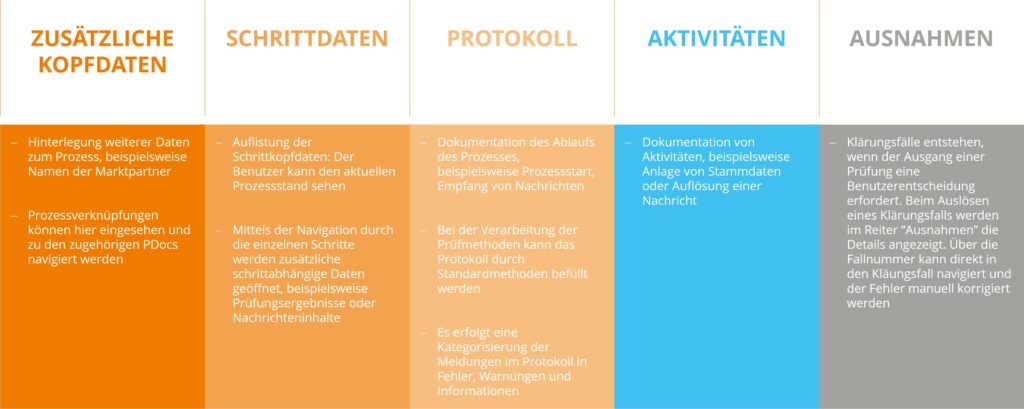
All information from the PDoc is stored in various tables, which appear as tabs. The process reference serves as the primary key. There is step-dependent and step-independent data, which is populated and retrieved depending on the stage of the process.
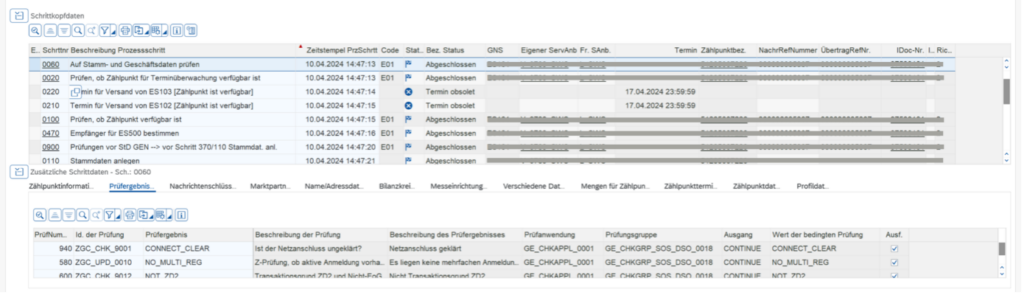
Zur Überwachung der PDocs wird die Transaktion /IDXGC/PDOCMON01 verwendet.

Further process information can be displayed below the header data via various tabs:
Process Customizing
Processes are created in the system via client-specific customizing. This can be done via transaction SPRO (Cross-company data exchange -> Market process management for utility companies -> Process configuration -> Define process configuration) or via view cluster maintenance SM34 ( /IDXGC/VC_PROC ).
1. Process configuration
Table: /IDXGC/PROC
The top level is the process configuration with basic information that defines the entire process.
- To uniquely identify the process, it is necessary to assign a process ID. The process ID serves as a key for assigning all relevant information and steps within the process.
- Mandatory parameters are the process class provided by the framework and the testing application. These define the framework for the process and ensure processing by the corresponding testing framework as well as the creation of the PDoc.
- When manually configuring a system, the source is always set to Customer C. This ensures that no custom implementation is overwritten during SAP deliveries. This applies to all levels of process configuration.
2. Process version
Table: /IDXGC/PROCVERS

The process version primarily serves to create new versions of a process without overwriting old configurations. This is particularly helpful for legally mandated changes to the process flow, such as format changes.
- The process version determines which “engine type” is used. The Common Layer uses the Process Engine, which replaces the old workflows with changeable documents.
- The execution mode can be divided into depth and width traversal. Traversals determine the node search algorithm and thus significantly influence the process flow.
- The “Valid from” field limits the validity of the version. Only one version can be valid at any given time.
3. Process steps
Table: /IDXGC/PRSTEP
- For each process step, the attributes step number, process step class, step type and category must be maintained.
- The active flag can be used to activate and deactivate steps.
- The step number determines the sequence of the process steps. Unless conditions prevent it, the steps are executed in ascending order.
- There are four process step categories: Start, Standard, Branch End, and End. The category and execution type can be selected intuitively.
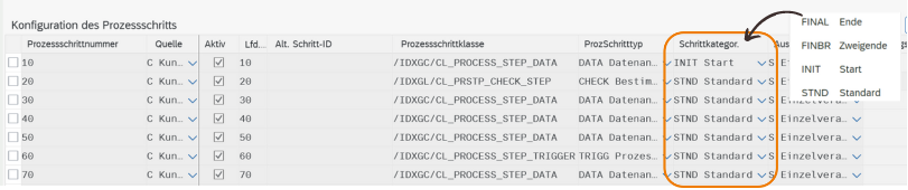
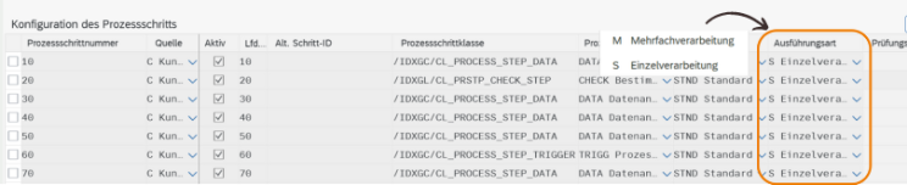
- The step types and the process step class dependent on them influence the processing of the step data. There are predefined classes that can be customized through subclasses and method redefinitions.

CHECK Determining the next step
This process step is used for modifying data and for audits when the next step cannot be determined solely by a linear sequence. The decision regarding the next step is made by calling the audit framework. By calling audit methods, values can be queried, determined, and updated, and the process flow can be influenced by the audit result.
DATA data system
As the name suggests, data creation is used for creating and updating data. This step type is used within the supply scenario and mostly in the initialization step.
TRIGG process trigger
If the process is to trigger another process, the corresponding process, including its ID, configuration, and step number, can be specified in a trigger step. This step automatically creates a process link for the PDocs.
Create a DLINE appointment
In some cases, process steps are scheduled to start at a specific time. By defining a deadline, a date can be set. The process then waits for the deadline to expire before proceeding. Deadlines can be defined in Customizing.
INBND OTBND Send and receive messages
Messages are processed incoming and outgoing messages. This is done via business message keys that call a specific format populated from the data in the PDoc structures. When an incoming message arrives, the data from the incoming message is transferred to the PDoc structures.
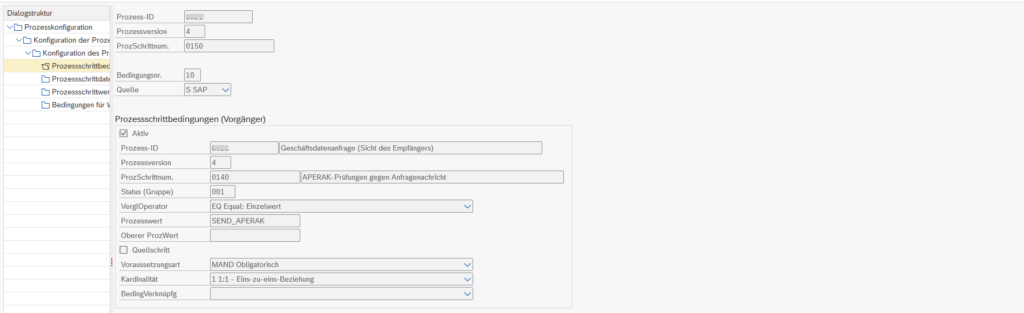
4. Process step conditions
Table: /IDXGC/PRSTPCOND
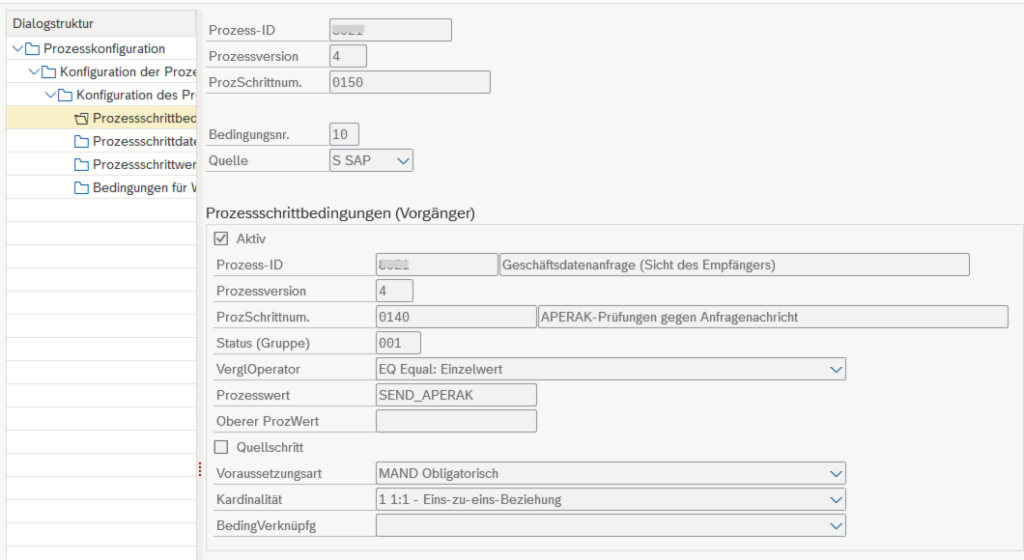
- Process step conditions allow the sequence of steps to be determined based on the outcome of individual steps. This allows the process flow to be controlled based on test results.
- The defined conditions allow for branching and the skipping of steps. Without preconditions, the steps are executed according to the execution mode.
- The step number of the corresponding process and the process value or status of the step (test result) are stored for this purpose.
- Multiple conditions are combined using the linking column with logical expressions (e.g., OR or AND).
The Common Layer is an essential component of modern energy supply for configuring and managing processes in the IS-U. The structured use of process documents and the precise configuration of process steps ensure that all operations run smoothly and in accordance with established standards.
A key advantage lies in the flexibility of expanding delivered processes and the ability to implement custom processes. This flexibility allows utility companies to adapt and extend existing processes to meet specific requirements. Processes can thus be tailored to individual business needs, leading to greater automation and, consequently, increased efficiency.
The process documents ensure that the processes are monitored and documented, and offer precise tracking as well as targeted problem solving in the process flow.
If you have any further questions or are interested in discussing this topic, please feel free to contact me.