By now, anyone involved with SAP should have heard of SAP’s in-house AI assistant: SAP Joule. But how exactly is this AI from SAP integrated into the working world of developers, consultants and customers? The first product with SAP Joule as its core technology is SAP Build Code. In theory, SAP Build Code sounds like the ideal development tool. However, anyone who has already tried to integrate AI into their personal development routine has probably asked themselves the question: Does SAP Build Code do what you expect it to do, or does the AI-supported development environment sometimes cause frustration among users?
What exactly is SAP Build Code?
SAP Build Code is a development environment that integrates SAP Joule as generative AI to support various development tasks. According to SAP, the AI is designed for Java and JavaScript application development. It also focuses on the various SAP technologies surrounding SAP Fiori: SAP Fiori Elements, SAPUI5 and the Cloud Application Programming Model (CAP).
How does SAP Build Code work?
SAP Build Code is a component of the low-code/no-code development platform SAP Build. This is a collection of modules that allows citizen developers to quickly and effectively build applications, business processes, and automations. It consists of three main components: SAP Build Apps, SAP Build Process Automation, and SAP Build Code.
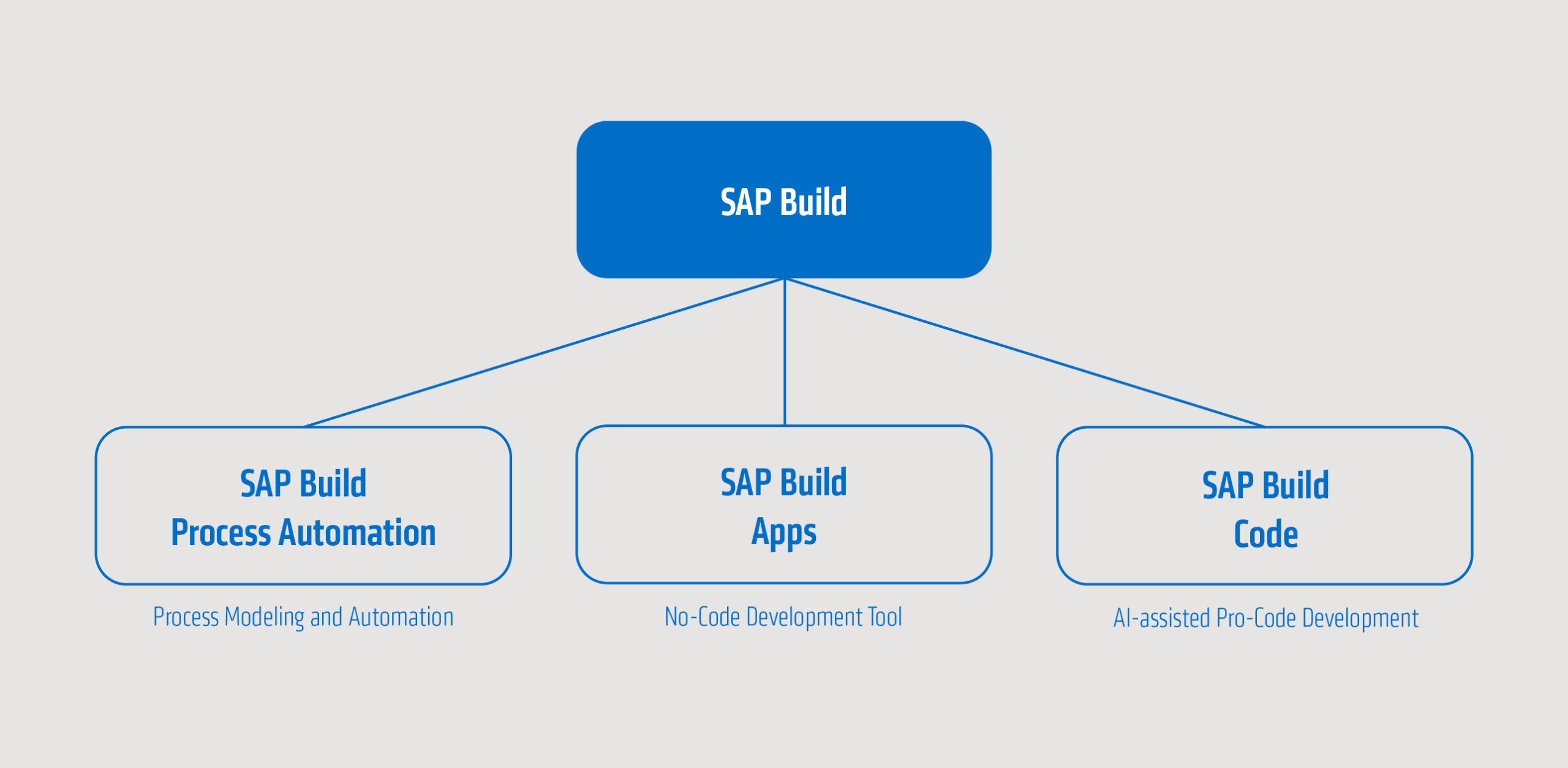
SAP Build Code is for this reason a special component of SAP Build, which serves a similar purpose to SAP Build Apps. However, SAP Build Code is aimed more at developers, whereas SAP Build Apps is aimed more at citizen developers. An SAP Build Code project can then be created and started from the SAP Build interface. There is a choice between full-stack, front-end, back-end, and mobile solutions. Once the project is up and running, Fiori developers will find themselves in the familiar environment of Business Application Studio. However, SAP Build Code offers an additional area for communication with SAP Joule in the left activity bar.
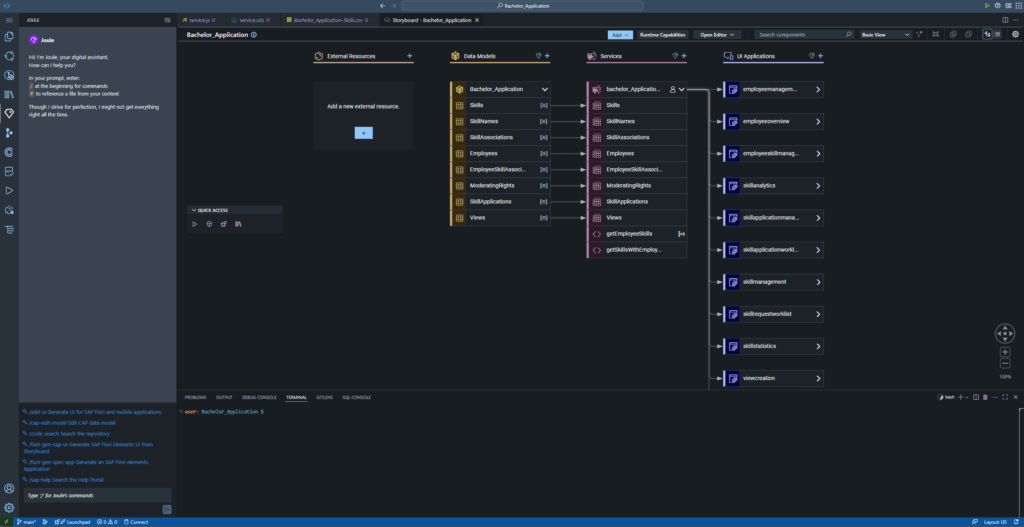
Most communication with SAP Joule takes place in this console. As usual, the AI is controlled via prompts. However, an additionalcommand must be placed before the prompt. This then determines the action of the AI. A complete overview of all commands can be generated with the command /help. Particularly important commands include /cap-gen-model for generating a data structure and /fiori-gen-cap-ui for building on the created CAP data structure. CAP is used here because it is the only supported SAP backend model. RAP cannot currently be programmed by SAP Build Code.
There are several other places where SAP Joule is integrated. One example is the storyboard. Here, external resources, data models, services, and UI applications can be listed. With the latter three, it is also possible to send a prompt directly to the AI. To do this, a prompt window can be opened via the Joule diamond.

SAP Build Code therefore enables various tasks to be performed in the SAP Fiori context. It can generate data models, Fiori UIs or mock data, check SAPUI5 code or refer to helpful SAP Help Portal articles.
H2: Reality check: My experiences
As part of my bachelor’s thesis, I took a closer look at the quality of SAP Build Code results. Specifically, I examined the creation of a CAP data structure, a service, business logic, Fiori Elements, and SAPUI5 pages based on the data model. Some aspects worked better than expected, while others did not function satisfactorily.
Advantages of SAP Build Code
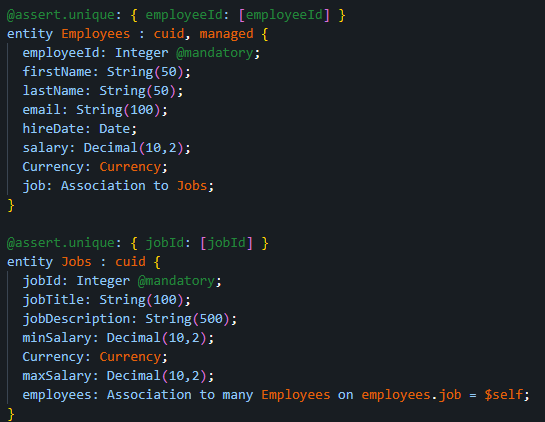
SAP Build Code delivers surprisingly good code quality for CAP-related topics. Specifically, this means that AI delivers usable results when creating data models and business logic. You can use AI for a predefined and developed data structure by writing a detailed prompt that covers all requirements. However, it is also possible to let the AI think for itself. This is useful when looking for inspiration or designing a test application. To demonstrate its capabilities, the following prompt is sent: Generate an employee table and a jobs table with relevant data and connect them.
Generate an employee table and a jobs table with relevant data and connect them.The AI generates the following structure based on the request:
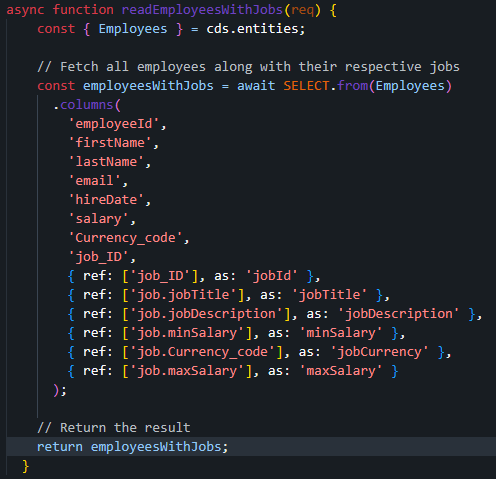
As mentioned earlier, AI also delivers functional results when generating business logic. To illustrate this, the following prompt was sent to the AI: Generate a function to read all employees and their respective jobs.
Generate a function to read all employees and their respective jobs.The resulting code looks like this:
However, when generating business logic, SAP Build Code does not support storing or integrating it correctly. A target file must be specified and no connection to a service is made. During testing, I managed to get the AI to make the correct connections once. However, I tried this with about 15 different prompts.
Optimisation potential
One major criticism is the generation of test data. The AI is capable of generating data that matches the test scenario. However, this data does not use unique keys, but rather uses the same key in multiple tables. According to database normal forms, this is an absolute no-go.
The AI has further weaknesses in all aspects of Fiori development. SAPUI5 applications are generated in the wrong folders and cannot be executed without the support of a developer.
SAP Build Code is also not particularly effective when it comes to developing Fiori Elements applications. Although executable applications are generated here, they are very basic. SAP Build Code either generates a list report, a detail page, or individual parts of both. More complex requirements cannot be implemented, even if it has been specified that no list view with a detail page is desired.
Conclusion
Overall, SAP Build Code already offers some interesting approaches to supporting SAP-based web development. However, in my opinion, the current quality level is not yet high enough to enable productive use of the tool. CAP development is already quite strong. Provided that the business logic is implemented correctly by SAP Build Code, it can be used by developers to support their work. I could also recommend SAP Build Code to new CAP developers to learn the basics using generated examples. However, advanced developers will derive little to no benefit from using it.
On the Fiori Elements and SAPUI5 side, there is still a lot missing to make productive use even conceivable. Since AI is constantly learning, this criticism could quickly become outdated. Further active observation and testing of AI is therefore recommended.