In modern enterprises, end-to-end integrations are the backbone of seamless business processes – be it for order processing, invoicing, or exchange with business partners. Apache Camel has proven itself as a reliable framework that seamlessly orchestrates data flows in SAP Cloud Platform Integration (CPI). However, with upcoming upgrades, SAP has significantly tightened the validation of expressions: What was previously tolerated now leads to hard errors during deployment. Anyone who does not convert ${in.body}, ${Property.customerName} and similar expressions risks blocked deployments, lengthy troubleshooting, and ultimately production outages.
What is Apache Camel?
Apache Camel is a widely used, lightweight open-source integration framework that operates according to the Enterprise Integration Patterns paradigm. It allows connecting various protocols and data formats with minimal boilerplate code and offers a variety of predefined components (e.g., HTTP, JMS, SOAP, File, SFTP) to quickly implement integration scenarios.
What Exactly Changes with the Update to Camel .14?
With the transition to Apache Camel >3.14, SAP has completely revised the internal validation of regular expressions. Here are the most important changes at a glance:
Alt: ${In.Body}                      → Neu: ${body}

Alt: ${Property.customerName}        → Neu: ${exchangeProperty.customerName}

Alt: ${Header.SAPClient}             → Neu: ${header.SAPClient}

Alt: ${BodyAs(String)}               → Neu: ${bodyAs(String)}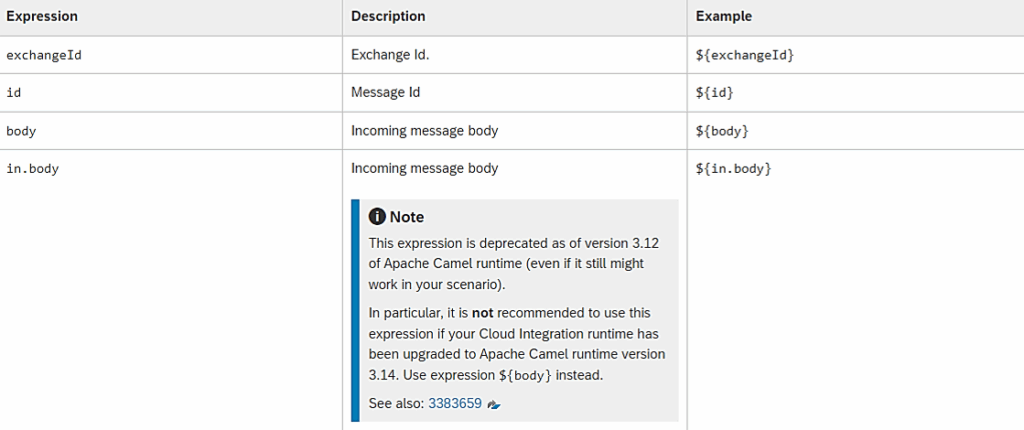
Upgrade Brings Risks
Why a “Small” Upgrade Becomes a Domino Effect
In classic Camel 2.x landscapes, faulty expressions sometimes led to isolated runtime warnings or message failures, but the flow itself usually still started. With Camel 3.14, however, the entire deployment process aborts as soon as even a single outdated expression appears in a flow definition. Imagine you have 80 packages, each with 10 flows – that’s 800 deployment steps. Even if only 30% of your flows contain outdated patterns, you risk 240 blocked deployments.
The Underestimated Effort: how Manual Proliferation Arises
Every deployment error first requires finding the faulty expression – a process that can easily take 30–45 minutes in complex flows with sub-processes and nested call activities. For an average package with 10 flows, this means: up to eight hours of manual search and correction effort. For 50 packages, this adds up to approximately 400 hours – or ten full working days.
When Integration Errors Become a Business Risk
Production outages in integration landscapes directly translate into missing orders, interrupted supply chains, and dissatisfied end customers. A domino effect that benefits neither reputation nor revenue. Therefore: A seemingly “small” syntax change must not be underestimated.
Upgrade Made Easy
Adesso CI SyntaxSavy – our Solutions for Secure Camel .14 Upgrades
With CI SyntaxSavy, our proprietary analysis tool, we at adesso have created a solution that reliably prepares integration landscapes for the Apache Camel 3.14 upgrade. The Python-based script automatically scans your SAP Integration Suite, identifies outdated expressions at the package, flow, and component level, and provides structured reports that show at a glance where action is needed.
CI SyntaxSavy is more than just a scanner – it is your data-driven roadmap for a smooth migration: no time-consuming troubleshooting in hundreds of artifacts, no manual workarounds, but a clear overview that presents priorities and risks at a glance. This way, you create transparency and control before the upgrade begins.
| Package | iFlow | Component in CPI | File |
| SAP S/4HANA Integration with Salesforce | Update_Account_from_Salesforce_to_SAP … | callActivity (Name: Put msg…) | Update Account from SF.iflw |
| SAP S/4HANA Integration with Salesforce | Replicate_Sales_Contract_from_Salesforce | callActivity (Name: Set Props) | Create Sales Contract from SF.iflw |
What Added Value Does the Report Bring for Integrators?
The report provided by adesso – generated via Python script – is far more than a simple list of outdated expressions. For integrators, it offers crucial advantages:
Targeted Error Identification
Instead of laboriously searching for ${in.body} & similar expressions in hundreds of artifacts, you can see at a glance which packages, flows, and components require action. This eliminates lengthy search processes and prevents code sprawl.
Minimizing Downtime Risks
By promptly and systematically processing the report results, you avoid unpleasant surprises during the Camel 3.14 rollout. The report thus directly contributes to operational reliability and customer satisfaction.
Conclusion
Thanks to the precise analysis by CI SyntaxSavy, we can proceed with targeted implementation: Outdated patterns are systematically identified and replaced, your flows are then end-to-end tested in a QA environment and secured with monitoring alerts. Our experienced consultants will support you throughout the entire process.