After discussing the preparatory measures and considerations for switching to the Budget Management System (BCS) in the first part of this blog post, this post aims to provide a practical approach to individual budget migration. I will therefore go into more detail below on how documents can be migrated from classic budgeting to the Budget Management System.
Practical approach to individual budget migration
For document migration, I recommend the following general procedure, which can be further detailed depending on the customer’s situation:
- Data preparation from classic budgeting
- Prepare migration files
- Migrate data
Data preparation from classic budgeting
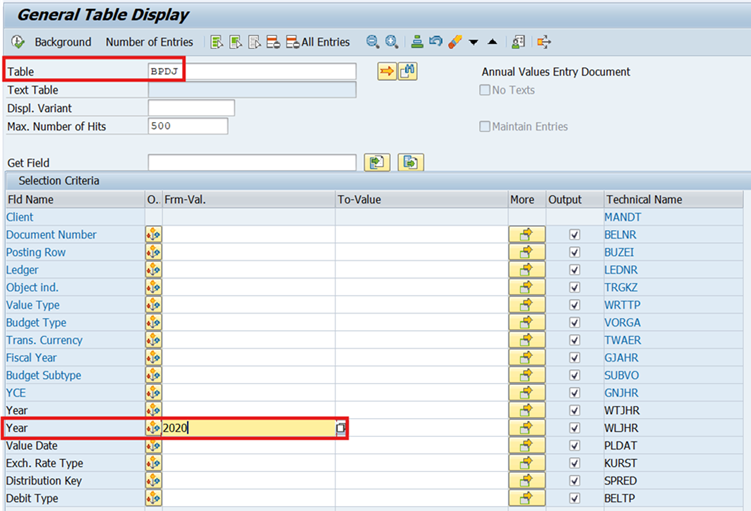
First, users call up TAC SE16N for table BPDJ and remove the restriction to 500 rows in the results list. Then, in the “Fiscal Year” field, they enter the year for which the export and initial migration are to take place. In this example, it is the year “2020.”
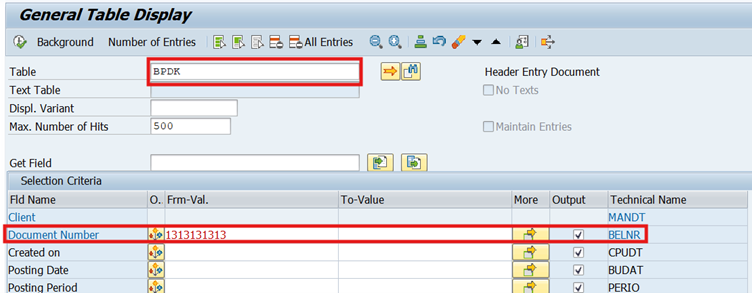
The results list is exported to Excel, and to ensure that no canceled documents are migrated, the BPDK table is called up after the BPDJ has been exported. The previously exported document numbers are then entered into the multiple selection using copy+paste, specifying the fiscal year:
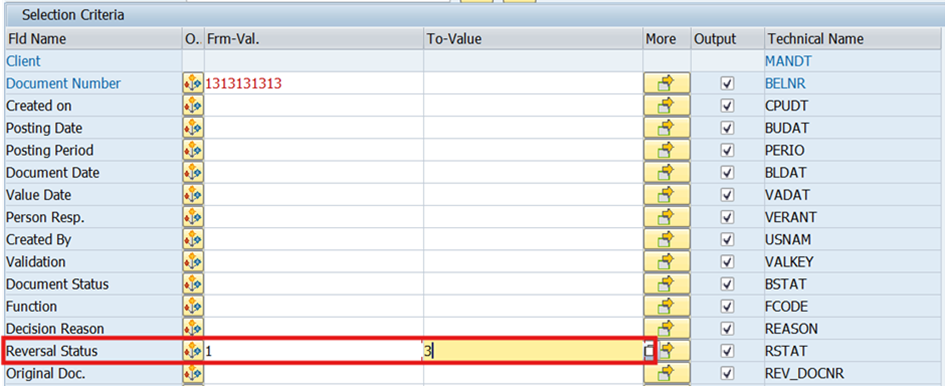
In addition enter 1 to 3 for the cancellation status:
The results list is exported back to Excel and both lists are compared by the users so that the canceled documents identified can be deleted from the BPDJ list. Alternatively, canceled documents can also be migrated; in this case, the “Exclude original/cancellation” checkbox is not selected in the corresponding migration transaction.
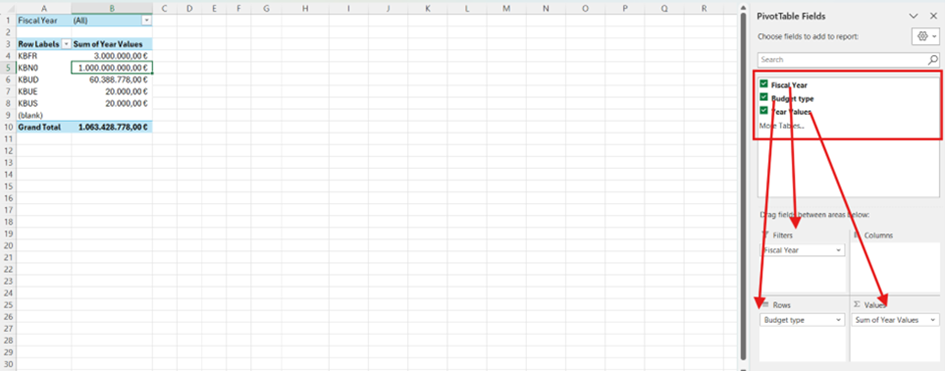
From the adjusted BPDJ list by fiscal year, the users create a PIVOT table with the following columns/rows:
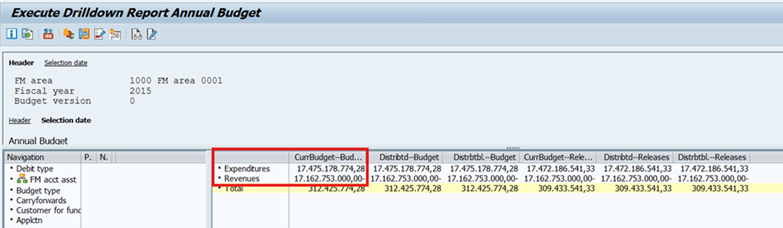
For an initial comparison with the values from classic budgeting, the TAC FMRP_3FMB4001 for the exported fiscal year is then called up in the SAP system in classic budgeting.
The total of the income and expenditure budgets must correspond to the Excel export of the budget types KBUD, KBN0 minus KBR0 in the PIVOT table.
NOTE:
In classic budgeting, there are transfer documents that post budget documents from one fiscal year to another. These can be recognized by the fact that the values of KBUS and KBUE are not identical in the PIVOT table. To ensure that the PIVOT and SAP report TAC FMRP_3FMB4001 match, the budget types are calculated in Excel as follows: KBUD + KBN0 – KBR0 – KBUS + KBUE.
Prepare migration files
If the totals between the export and the SAP standard report match, the total export is sorted by budget type and, depending on the budget types used by the customer, the migration is then carried out in the following order:
- KBUD Original
- KBN0 Supplement
- KBR0 Return
- KBUS Transfer
- KBFR Release
NOTE:
If the budget documents are transferred in bulk via LSMW using the “Complete migration” option, the duplicate document numbers are removed using the corresponding Excel function after the spreadsheets have been created for each budget year.
Furthermore, for transfer documents, only one of the two budget types KBUS or KBUE must be selected, as a document contains both sender and recipient budget document items.
Performing migration
Once the migration files have been prepared, they can be migrated manually or automatically via LSMW.
The final check of the migration is carried out in two steps:
- After each migration of a budget type from classic budgeting, the migrated amounts can be checked against the totals for each migration file using the BCS transaction FMEDDW by fiscal year and BCS budget type.
- Once all data has been fully migrated, BCS budget reports such as FMRP_RW_BUDGET – Budget Overview can be used for comparison.
Conclusion
This second part of the practical budget document migration represents only a small part of our expertise. With our many years of experience in a wide variety of migration projects, we at adesso business consulting are happy to help you answer your questions about SAP funds and grants management. We look forward to hearing from you.