LSMW – a tool that was widely used in classic ERP systems – has been incorporated by SAP into the simplification Item List and is now only available to a limited extent in S/4HANA (see SAP Note 2287723). In this article, we show that there is no need to panic and that alternatives exist.

LSMW in S/4HANA: What does this mean for customers?
LSMW – the Legacy System Migration Workbench – was a familiar and widely used tool for many years, both for data migrations and for recurring tasks in the various SAP modules. With simple means, massive amounts of master data could be created or periodic tasks executed in the system – without significant implementation effort and without requiring programming knowledge.
While LSMW still works in principle under S/4HANA, SAP explicitly points out that its use is at the customer’s own risk and that the results must be thoroughly tested by the customer. Many functions are no longer supported (e.g., screen recording in SAP Fiori apps is not possible). Additionally, the interfaces and transactions have changed.
As a strategic successor solution for data migration, SAP has therefore introduced the SAP S/4HANA Migration Cockpit. This tool is actively being developed by SAP and represents the recommended standard solution for migrations to S/4HANA.
SAP S/4HANA Migration Cockpit
SAP subsequently developed the Migration Cockpit for such purposes. The Migration Cockpit is available as a modern Fiori app and serves as a new tool for data migration in both on-premise systems and private cloud environments.
LSMW vs. SAP Migration Cockpit
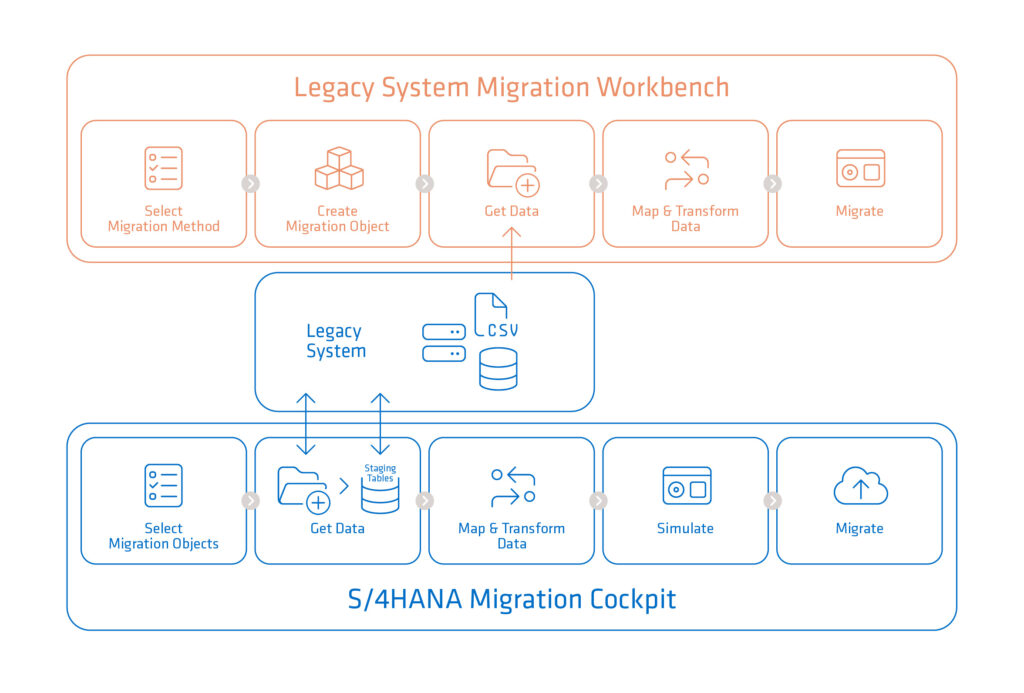
The image shown above illustrates the differences between LSMW and the SAP Migration Cockpit. In addition to the newly introduced staging table, the ability to simulate migration data in advance has been added.
Tools
LSMW offers neither comprehensive analysis nor convenient monitoring functions. Migration simulation is only possible to a limited extent (e.g., via batch input). The SAP Migration Cockpit, on the other hand, provides functions via a Fiori app to simulate and analyze migration data and then perform the actual migration.
Data Sources
The SAP Migration Cockpit supports two basic approaches to data migration:
- File-based migration: The data is first temporarily loaded into the SAP system via files. There, it can be checked and adjusted before the final transfer.
- Direct data transfer: Data can be migrated, for example, from an EWM system directly from the R/3 database tables into the corresponding S/4HANA tables. This saves a significant amount of time and reduces manual effort.
While LSMW essentially only supports classic CSV files as data sources, the SAP Migration Cockpit supports not only CSV files but also XML files, as well as direct access to SAP tables in other systems. In many cases, this eliminates the need to export and subsequently edit data in external files.
Data Processing
LSMW and the Migration Cockpit also differ significantly in the way they process data:
- LSMW: Supports screen recordings, existing reports (e.g., RCCLBI02), BAPIs, and IDocs.
- SAP Migration Cockpit: Uses function modules, BAPIs (with the known limitations; see SAP Note 2590165), as well as modern RAP and Business Object Services, which SAP is increasingly relying on.
Migration Objects
Currently, SAP provides over 260 predefined migration objects for a modern SAP S/4HANA Cloud Public System, and over 400 objects for an SAP S/4HANA on-premise system.
If these standard objects are insufficient, you can define and extend your own migration objects using transaction LTMOM (not LTMON).
We will explain more about the Migration Cockpits Objects in further blog articles.
Conclusion
Although LSMW still works in parts within S/4HANA, it should be used with great caution. It is recommended to switch to the new technology – the SAP Migration Cockpit – whenever possible to take advantage of the latest technical capabilities.
Nevertheless, the SAP Migration Cockpit (just like LSMW in the past) should not be misunderstood as a mass change or “mass update” tool. It is not a substitute for integration solutions such as the SAP Integration Suite (CPI) or other integration scenarios designed for permanent and automated data processes.
We at adesso business consulting are happy to support you and analyze your system together with you. Together, we will find the optimal migration and/or data processing strategy for you. We look forward to hearing from you!