Service Binding, metadata, CSRF token, and PATCH requests from a practical perspective
In the previous sections, I explained why it is worth connecting an external application to SAP through a RAP/OData-based service, and we also went through how the RAP object chain is structured on the SAP side. At the end of the development process, however, a very practical question arises: how do I know exactly which URL the external application needs to call, which entity sets are available, which fields the service expects, and how can a modifying request, such as a PATCH operation, be executed?
The focus now is not on creating new RAP objects, but on validating the completed OData V4 service and preparing it for consumption. This is especially important because the integration of an external application should never be implemented based on assumptions. The exact endpoints, field names, keys, and data types must be read from the SAP-side service.
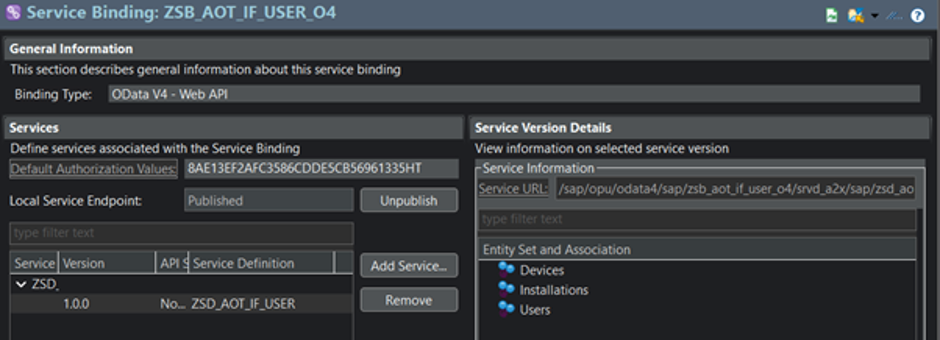
Where can I find the service root URL?
One of the most important pieces of information for an external application is the service root URL. This is the base URL relative to which we call the entity sets, the metadata document, and URLs that point to specific records. It is not worth constructing this manually. The correct starting point is the Service Binding object in Eclipse/ADT. Here you can see which service definition has been published, which binding type is used, and the URL at which the service is available.
Simplified format:
https://<host>:<port>/sap/opu/odata4/.../<service>/0001/A fontos tanulság: a külső alkalmazás nem a CDS view nevét, nem a behavior nevét és nem az adatbázistábla nevét hívja. A külső alkalmazás a publikált OData szolgáltatás service root URL-jéből indul. Ha ez az URL hibás, akkor minden más is hibás lesz: a GET, a metadata lekérés, a CSRF token kérés és a PATCH művelet is.
How do I know the name of the entity set?
Another common misunderstanding concerns the entity set name. People often try to call the name of the projection CDS or interface CDS. That is the wrong approach. From the external consumer’s perspective, what matters is the name under which the object is exposed in the service definition.
For example:
define service ZUI_AOT_IF_USER_O4 {
expose ZC_AOT_IF_USER as Users;
}
In this case, the entity set name for the external application is:
UsersSo a simple GET request might look like this:
GET <service-root>/UsersThe metadata can be accessed as follows:
GET <service-root>/$metadataThis is a very important distinction. The external application does not need to know internal SAP object names; it needs to know the published service contract.
What is /IWFND/V4_ADMIN used for?
/IWFND/V4_ADMIN is the SAP Gateway administration interface for OData V4 services. Here you can verify whether the service group has been published, whether the service is reachable, and you can also test the given OData V4 endpoint. During the project, this was a key step because having a Service Binding created in ADT did not by itself guarantee that the external application could already consume the service. The Gateway-side publication also had to be configured correctly.
What is worth checking here:
- whether the service group is visible;
- whether it is in published status;
- whether the service test can be started;
- whether a simple GET request works;
- whether the metadata is accessible.
If these do not work on the SAP side either, there is no point looking for the problem in the C# client, Postman, or any other external application. The SAP-side publication must be fixed first. To access the service test, locate the published endpoint and click the Service Test tab. This opens the test interface where we can work with the service.
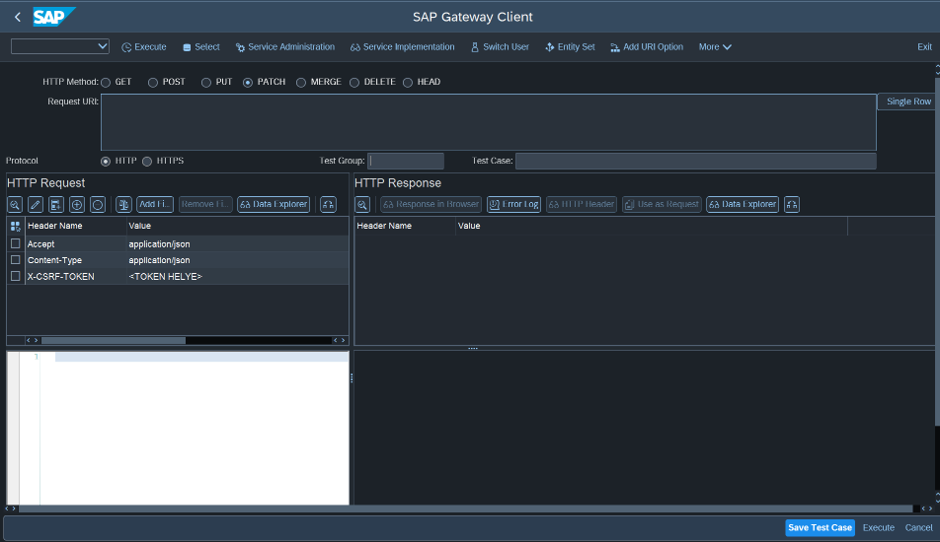
The role of metadata
The $metadata document is one of the most important parts of an OData service. It describes which entity sets are available, which fields exist, which fields are keys, which data types the service expects, and how the external application must communicate with SAP. Therefore, the external application should not be adapted to our own assumptions, but to the metadata document.
Example:
GET <service-root>/$metadataThe metadata reveals, for example:
- the exact name of the entity set;
- which field is the key;
- which fields exist;
- the exact names of the fields;
- which data type SAP expects;
- which fields can be modified;
- whether navigation relationships or ETag information are available.
This is especially important for POST or PATCH requests. If the metadata says a field is named IsActive, then that exact name must also be used in the payload. If the metadata publishes a field as a string, we cannot send it as though it were a boolean. Metadata is therefore not just an incidental technical file. It is the contract between the service and the external application.
What is the X-CSRF-Token?
The CSRF token is important for modifying HTTP operations such as POST, PATCH, PUT, or DELETE. The idea is simple: the client must first request a token and then send that token back in the header of the modifying request.
Typical token retrieval:
GET <service-root>/With the following headers:
Accept: application/json
X-CSRF-Token: Fetch
SAP returns the token in the response:
X-CSRF-Token: <token-value>For the modifying request, it must be sent back in the header:
X-CSRF-Token: <token-value>The critical point is that not only the token must be retained, but also the session cookies returned by SAP. If the token belongs to one session but the PATCH request is sent in another session, the request may fail. This is one of the typical reasons why a modification works in the SAP Gateway Client but fails from an external application.
Which headers are important?
For a GET request, the Accept header is usually sufficient:
Accept: application/jsonFor token retrieval:
Accept: application/json

X-CSRF-Token: Fetch
For a PATCH request, you need to pay attention to the following:
Content-Type: application/json

Accept: application/json

X-CSRF-Token: <token-value>

Cookie: <session cookie returned by SAP>
In some cases, an If-Match header may also be required, for example when ETag-based or concurrency handling is used:
If-Match: *However, this should not be used blindly. Whether it is required must always be determined from the service metadata document and the GET response. A header is not decoration. It is part of the integration contract.
Executing a PATCH request
The purpose of PATCH is to partially modify an existing record. To do this, you first need to know the exact URL of the record. This URL is built from the service root, the entity set name, and the key field.
Simplified example:
PATCH <service-root>/Users('<UserId>')The exact key format must always be checked against the $metadata document. If there are multiple key fields, or if the service expects a named-key format, the URL may look different.
Example PATCH headers:
Content-Type: application/json

Accept: application/json

X-CSRF-Token: <token-value>

Cookie: <session-cookie>
Example body:
{

"IsActive": false

}
This is correct only if, according to the metadata, IsActive is actually exposed under this name and type as a modifiable field. If the service expects a different type, the payload must be adjusted accordingly.
For PATCH, three things must always be checked:
- am I sending a field that exists;
- am I sending a field that can be modified;
- am I sending a data type that the service expects according to the metadata.
If any of these are incorrect, it is not SAP that is “wrong”; the client is failing to comply with the service contract.
Key takeaway
Using an OData V4 service does not begin with sending an HTTP request from the external application. First, the exact service root URL must be identified in the Service Binding. Then you need to check under which entity set name the service definition publishes the object. In /IWFND/V4_ADMIN, you must verify that the service group is published and testable. A GET request should be used to prove that the service is reachable. Based on the metadata, the keys, fields, and data types must be understood. Only then does it make sense to work with modifying operations such as PATCH requests.
The most important lesson for me was that the external application must be aligned not with my own assumptions, but with the contract described by the metadata. If we follow this principle, SAP integration becomes much more predictable. Instead of guessing, we work against a verified service contract.