The global business landscape is facing one of the most significant technological turning points of the past decades. With SAP’s announcement that it will end standard support for its core product, SAP ECC 6.0, on December 31, 2027, a race against time has begun. While companies can take advantage of an extended support option for an additional fee until the end of 2030, the strategic imperative is clear: The transition to SAP S/4HANA is no longer an option, but a fundamental prerequisite for future viability in a data-driven world. This transformation marks the shift from a transactional system to an intelligent digital core. This enables real-time analytics, AI-powered automation, and a radical simplification of data structures.
Strategic Context of the Greenfield Approach
Choosing the right transformation strategy is the first and most consequential decision in any S/4HANA project. While the Brownfield approach technically converts the existing system and largely preserves processes and data sets, the Greenfield approach radically reimplements the system from scratch. This strategy is particularly attractive for companies whose current ERP landscape is burdened by decades of customizations, inefficient processes, and poor data quality.
The New Data Model: The Business Partner as the Central Anchor
In S/4HANA, SAP has fundamentally simplified the traditional data model for master data. The business partner (BP) is now the sole object for managing customers and vendors. This concept is not entirely new—it has already been used in solutions such as SAP CRM or SAP SRM—but in S/4HANA, it is now mandatory for the digital core.
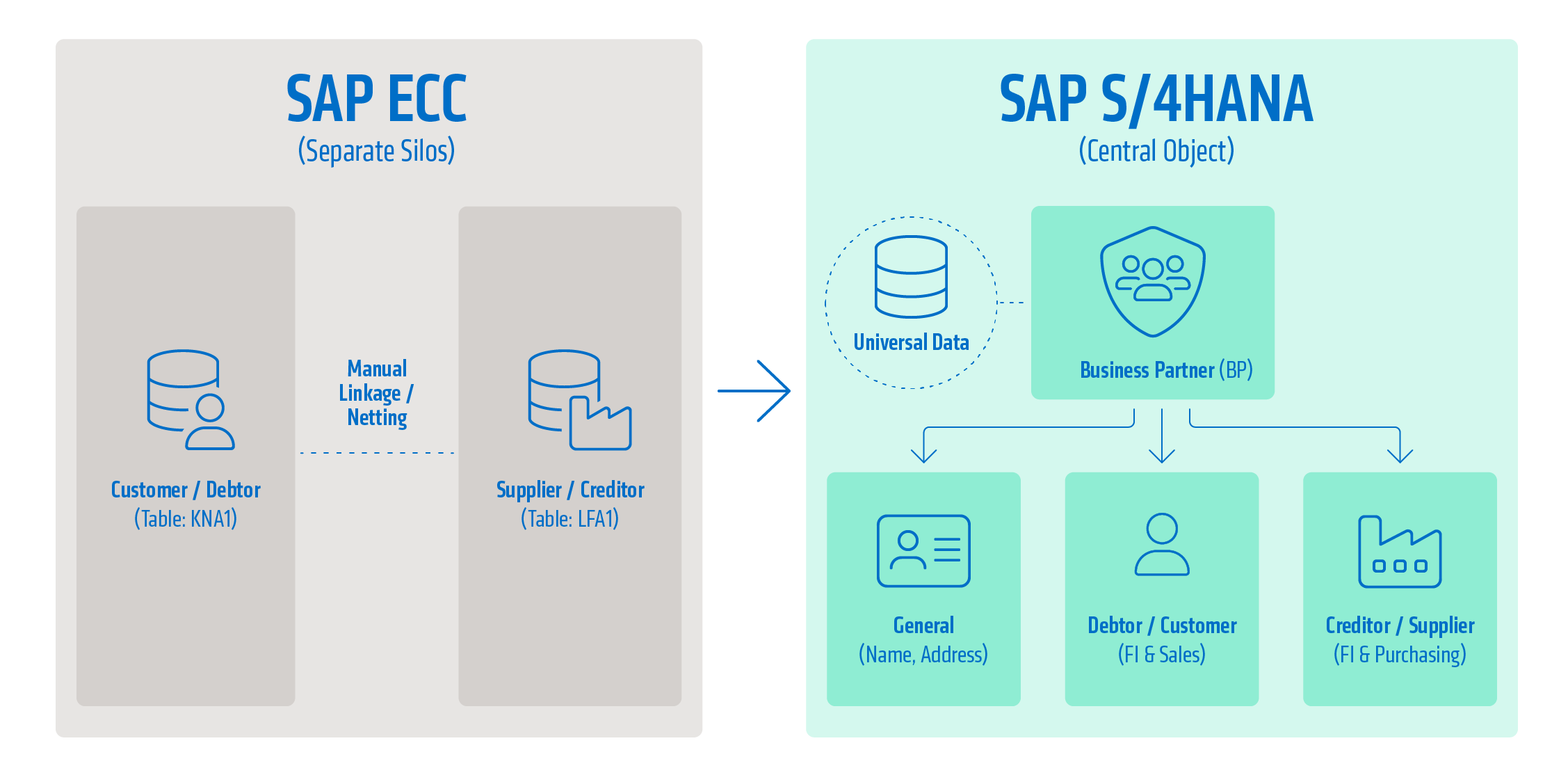
Customer Vendor Integration (CVI) is the technological backbone that ensures synchronization between the business partner object and the customer and vendor master records that are still required in the background. In S/4HANA, the system retains the old tables (such as KNA1 for customers and LFA1 for vendors) for compatibility with downstream processes and reports, but no longer maintains them directly. You can learn more about this in another blog post here.
The business partner (BP) acts as a “single point of entry.” Every creation or modification of a business contact is performed via the “BP” transaction or corresponding Fiori apps. As soon as a business partner is saved, the CVI component synchronizes the corresponding data into the accounts receivable or accounts payable tables without creating redundancies.
The introduction of the business partner resolves a fundamental problem in the old ECC environment: the lack of a link between customers and vendors. In many global trade relationships, a single partner acts as both a buyer and a seller. In the ECC system, this required the creation of two separate master records, which often had to be manually linked—a tedious process—to enable, for example, the netting of open items. You can read more about this here.
The Business Partner provides a holistic view of identity. A single BP master record (identified by a unique GUID) can assume multiple roles. These roles, in turn, function as data management views. For example, there are roles for basic data such as name or address, roles for financial data, and roles for sales and purchasing data.
This modular role architecture significantly enhances data integrity. Changes to the central address immediately affect all roles, thereby preventing inconsistencies between the purchasing and sales departments.
The Solution: Modern Data Migration Using the Staging Table Approach
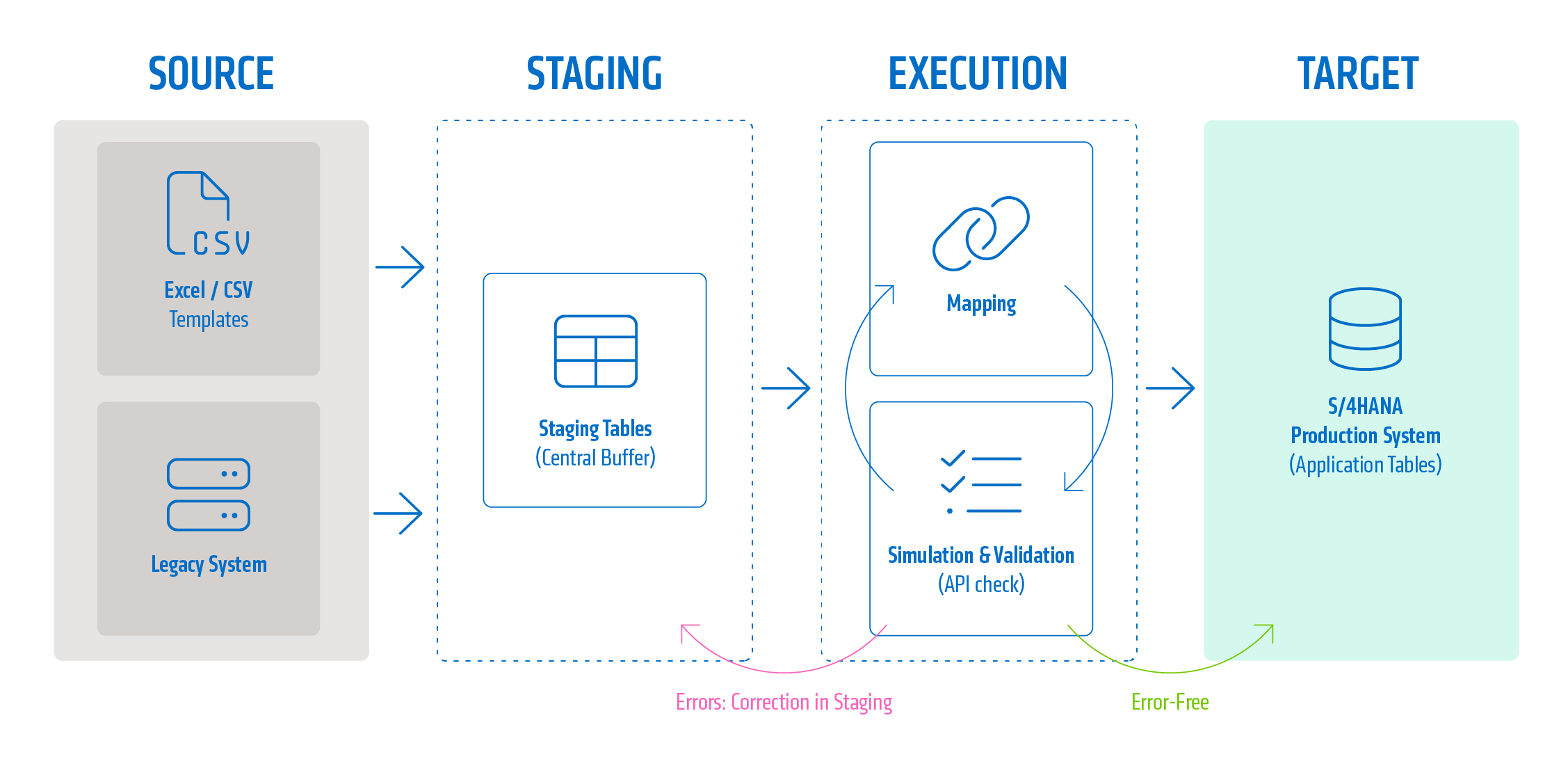
In a greenfield scenario, the SAP S/4HANA Migration Cockpit (Fiori app “Migrate Your Data”) is the primary tool for data migration. In recent software releases, SAP has technologically unified the previously separate approaches (file-based vs. staging-based). Today, staging tables act as a central, temporary buffer in the SAP S/4HANA schema, regardless of the type of data delivery.mRead more about the Migration Cockpit here.
The process using the aforementioned app follows a clear structure, in which the staging tables serve as the linchpin for data validation:
- Project creation: A migration project is created.
- Bereitstellung (Staging): Die Staging-Tabellen werden automatisch vom System generiert. Sie können nun auf zwei Wegen befüllt werden:
- Template Upload (XML/CSV): Users fill out the Excel or CSV templates provided by SAP. Upon upload, the data is automatically transferred to the corresponding staging tables.
- Direct Loading (ETL): Using SAP Data Services or third-party tools, the tables are populated directly at the database level (HANA), which is particularly efficient for large volumes of data.
- Preparation & Mapping: The system prepares the data in the staging tables. This is where legacy values are mapped to S/4HANA structures (e.g., account groups to GP groupings).
- Simulation: The data is validated against the target APIs. Erroneous data records can be identified immediately and corrected either in the staging tables or via a correction file.
- Migration: Only after a successful simulation is the data finally posted from the staging tables to the S/4HANA application tables.
By using staging tables as an intermediate layer, the migration benefits from significantly greater stability and transparency. Since the data is already in the HANA schema, complex consistency checks and simulations can be performed efficiently before making changes to the production system. Additionally, this approach allows for easy correction: If an instance fails, you only need to adjust that specific data record in the staging table and reprocess it.
Lessons Learned: Practical Pitfalls
Migrating business partners is a highly complex undertaking that goes far beyond a mere technical import. In practice, three to four typical pitfalls have emerged that can determine success or failure.
Stumbling Block 1: Harmonizing Number Ranges
In a greenfield scenario, the question arises: Should the old numbers be retained, or should a completely new numbering scheme be introduced? The “keep the same numbers” approach is popular with business departments, but it presents technical challenges. If numbers for customers and vendors overlapped in the past (e.g., Customer 1000 and Vendor 1000 existed in parallel as separate entities), only one of them can be assigned the number 1000 as a business partner number in S/4HANA. In such cases, a careful analysis of the number range intervals (transactions XDN1 for customers, XKN1 for vendors) in the source system is absolutely necessary.
Best Practice: It is recommended to choose internal assignment for the business partner number range. Set the customer and vendor numbers to “external” via the CVI configuration to adopt the business partner number. This ensures that the business partner number and the customer and vendor numbers remain identical as long as there are no conflicts. It should be noted, however, that you will ultimately continue to work with the customer and vendor numbers. You can merge a vendor and a customer into a single business partner and, for example, adopt the customer number. The only advantage of this is that you no longer have to think too much when entering the number in the document on the customer side. On the vendor side, the system continues to use the different vendor number.
Stumbling Block 2: Mapping Errors
The CVI configuration requires a precise mapping of each ECC account group to a corresponding business partner grouping in S/4HANA. A common error is an overly complex mapping scenario that attempts to replicate outdated account group structures on a 1:1 basis. This contradicts the greenfield approach of process simplification. Care should be taken to ensure that the GP grouping primarily determines number assignment. Overloading the system with too many groupings increases maintenance complexity and hinders standardization.
Stumbling Block 3: Underestimated Data Quality in Source Systems
“Garbage in, garbage out” applies particularly to S/4HANA. The validation checks in the new system are significantly stricter than in the old ECC. Typical sources of error include:
- Inconsistent address data: Missing required fields such as ZIP codes or invalid country codes block the entire GP import.
- Bank details: Outdated IBAN structures or incomplete bank master data lead to simulation errors.
- Tax ID numbers: S/4HANA often validates tax ID numbers against country-specific schemas, which leads to massive rework if legacy data is not properly maintained.
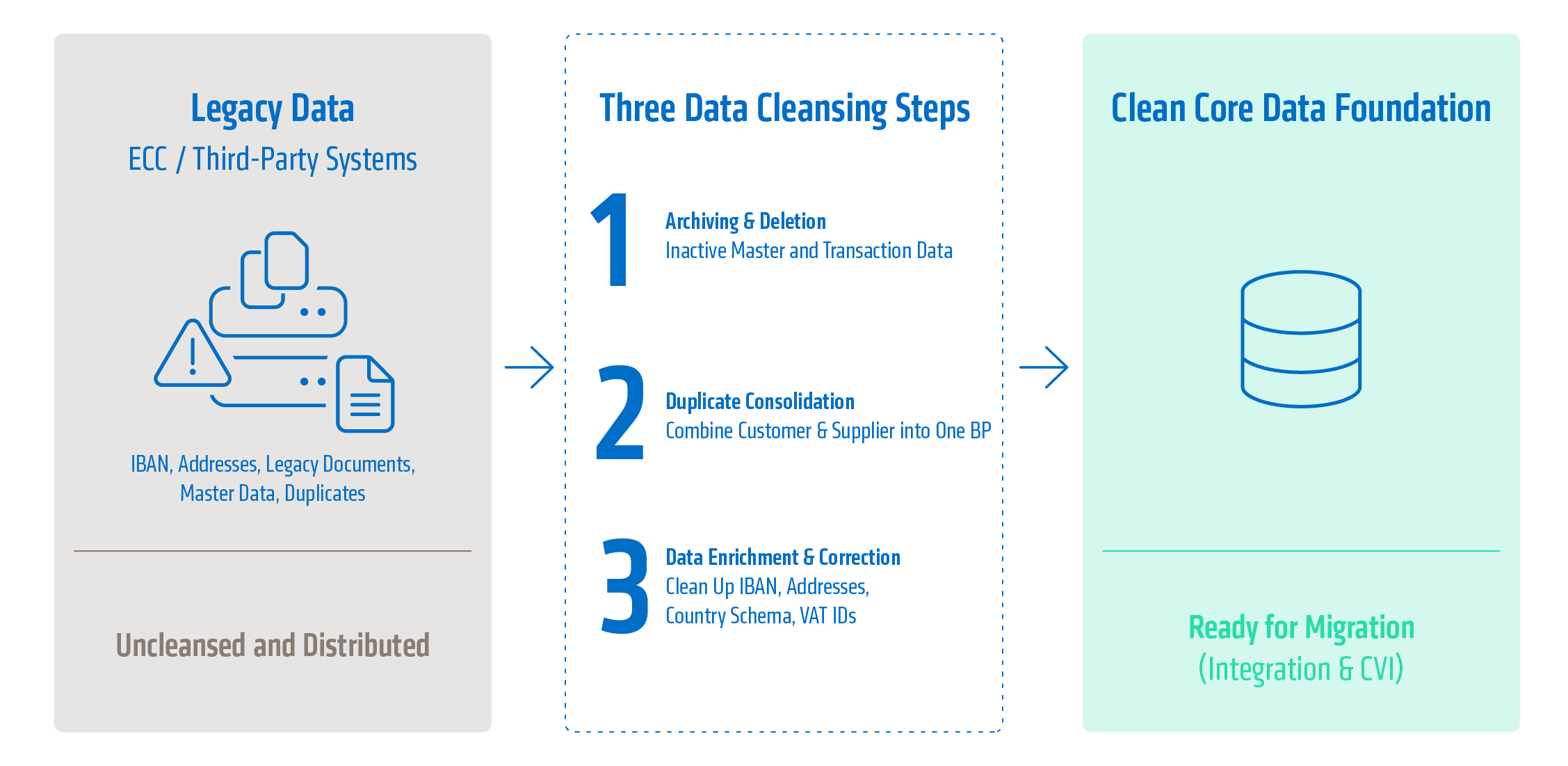
Early data cleansing and archiving of master data that is no longer needed before the migration begins are therefore not optional tasks, but critical path elements.
Technical Validation and Use of Tools
In addition to the Migration Cockpit, specialized analysis tools such as the SAP Readiness Check should be used early on. This tool not only identifies technical incompatibilities in custom code but also provides insight into the necessary simplification items in the area of master data.
For complex transformations involving the consolidation of data from multiple legacy systems (SAP and non-SAP), the Migration Cockpit alone is often insufficient. This is where solutions such as SAP Data Services or Natuvion DCS come into play, enabling advanced transformations, duplicate checks (fuzzy logic), and data enrichment.
Conclusion and outlook
The transition to SAP S/4HANA is far more than just an IT project. It is a business-critical transformation that lays the foundation for the next two decades. The migration of business partners forms the backbone of the new system. A greenfield approach offers a unique opportunity to straighten out this backbone and benefit from a clean, standardized data foundation.
In summary, three pillars for a successful business partner migration can be identified:
- Holistic planning: The definition of the number range logic and the business partner role model must be completed before technical implementation to avoid costly course corrections during implementation.
- Focus on data quality: Investing in data cleansing pays off in multiple ways—through smooth migration runs, higher user acceptance, and the ability to effectively leverage advanced technologies such as machine learning.
- Change Management: The shift from the traditional customer/vendor mindset to the business partner concept requires intensive support for users. Understanding the new role model is essential for day-to-day work in Fiori.
The migration to the business partner model is the foundation for your processes in SAP S/4HANA—and this is precisely where the wheat is separated from the chaff. At adesso business consulting, we view the business partner not merely as a technical field, but as the heart of your digital transformation. Our team has a proven track record of successfully supporting numerous greenfield projects. Let’s work together to ensure that your greenfield project delivers what it promises: a clean, standardized data foundation for your future business success.