SAP Build Process Automation (SBPA) is a cloud-based low-code/no-code service of the SAP Business Technology Platform (BTP) that enables companies to create, automate, and manage workflows, approval processes, and other business processes. Business units and IT departments can model processes with minimal programming effort and automate repetitive tasks, thereby reducing error rates in day-to-day operations and increasing the automation rate of business processes.
By executing these processes outside the SAP S/4HANA core system, SBPA supports the clean-core approach and helps keep the core system close to the standard and upgradeable. For more information, click here.
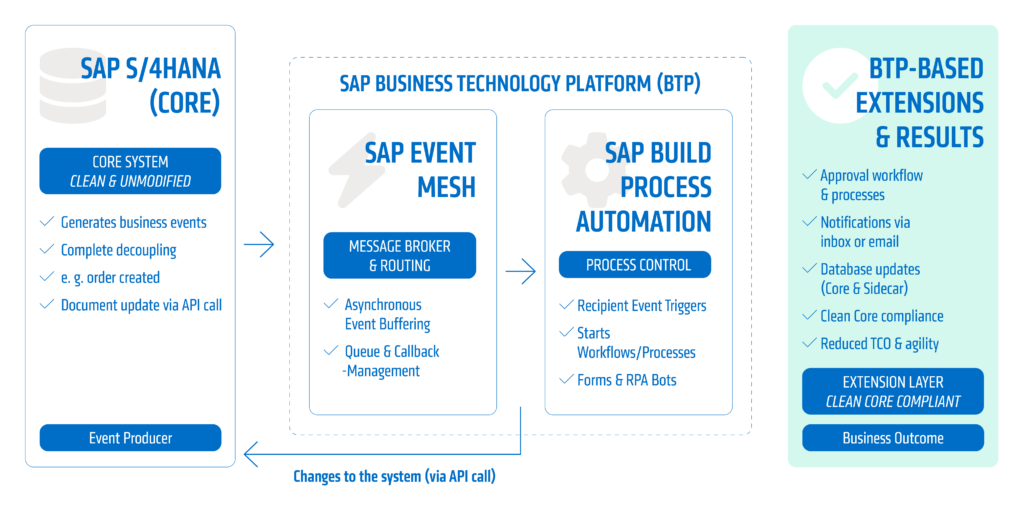
Features and Benefits of SAP Build Process Automation
SAP Build Process Automation combines various tools for automating and digitizing business processes into a single, centralized platform. Companies benefit from faster workflows, reduced manual effort, and flexible implementation of new processes. Key features include:
- Workflow automation: End-to-end control and partial automation of processes
- Process modeling: via intuitive, graphical editors with audit-proof versioning
- Digital Forms: Easy data entry and output via simple forms for end users
- Robotic Process Automation (RPA): automates repetitive mouse clicks and data entry on the screen, ideal for legacy systems or media breaks
- Business Rules Management: Centralized definition of decision logic within the process
- Process Monitoring: Transparent analysis and performance monitoring during live operations
- Cross-System Integration: Connects SAP and non-SAP systems via APIs and events for seamless end-to-end processes
- AI Integration: Enables intelligent analysis of data and documents as well as AI-supported decisions within workflows
Practical Example – Approval Process with SAP Build Process Automation
Requirement
Free-of-charge items in sales orders may not be shipped without approval. If the review is performed manually, it results in delays and increased coordination efforts between the departments involved.
The following real-world example demonstrates how SAP Build Process Automation fully supports and automates this approval process digitally. Relevant orders are automatically identified, forwarded to the responsible approver, and the decision is then processed directly in the SAP system.
The result from the users’ perspective
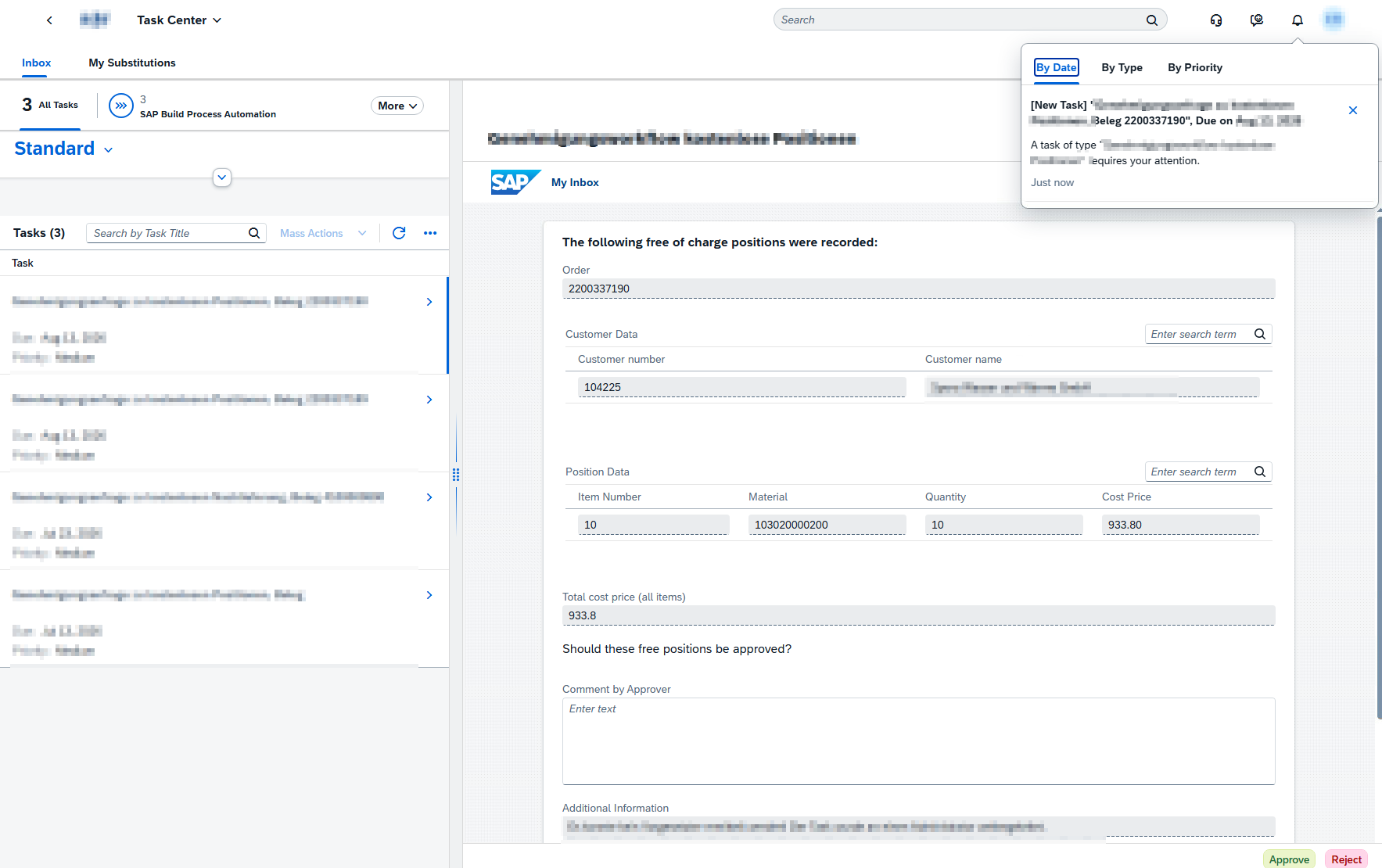
As soon as a sales order with free-of-charge items is created, the responsible approver automatically receives a new task in their personal SAP inbox. All information relevant to the decision is provided in a clear approval form. Users can review the order directly and approve or reject it with a single click.
But how does this task appear in the inbox?
Here’s how the process works behind the scenes
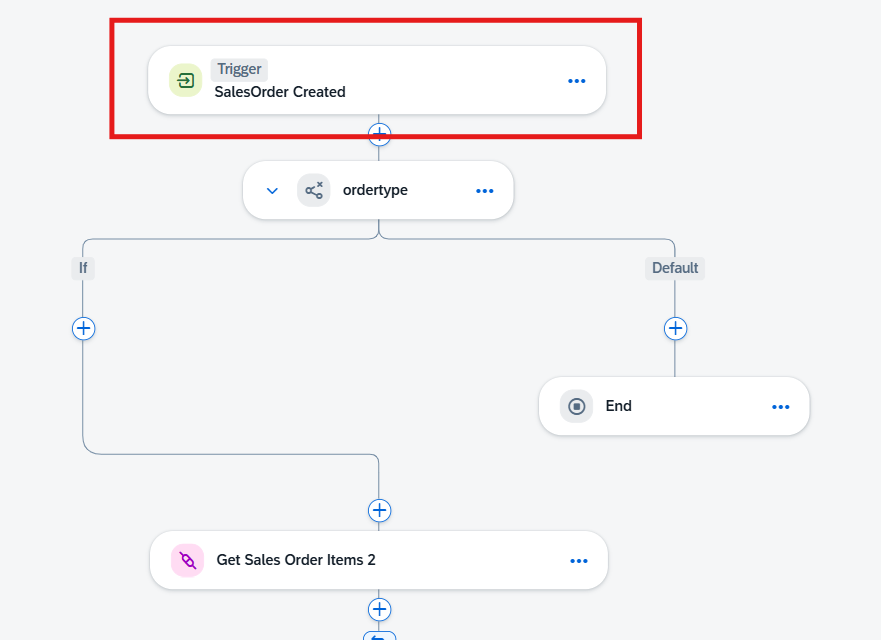
In the background, SAP Build Process Automation automatically starts the workflow using the Event Mesh as soon as a new sales order is created in SAP S/4HANA. The order items are read and checked via standard APIs. If the order contains free-of-charge items, the workflow automatically identifies the responsible approver and creates the corresponding task in their personal inbox.
During the review, the delivery block set in the SAP standard system remains in effect. As a result, the order cannot be processed further until a decision has been made.
Data can be imported not only via APIs but also, if needed, from documents or emails and processed further within the workflow. Optionally, the SAP Document Management Service can also be integrated to make documents available directly within the approval process. Read more about this here.
Automated Decisions without manual Follow-Up
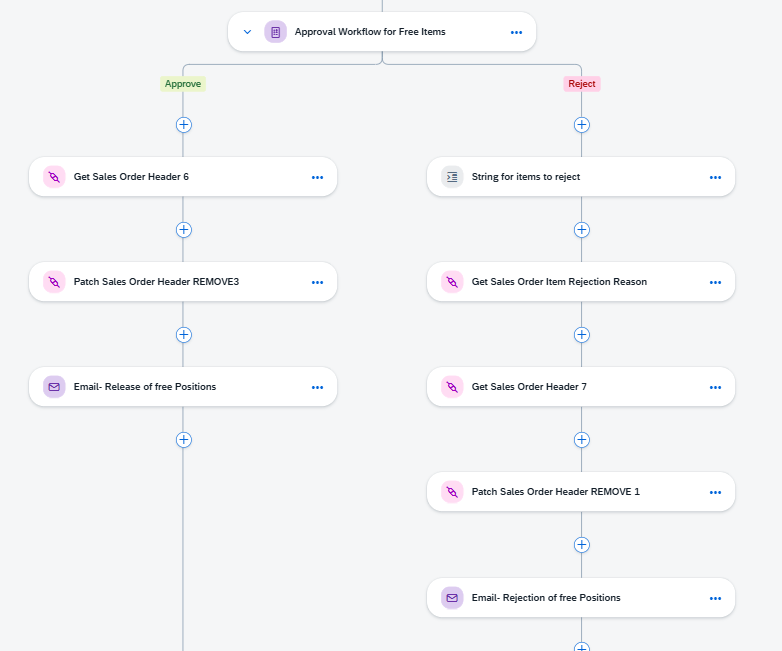
Once the approver has made a decision, SAP Build Process Automation automatically executes the defined follow-up steps. If approved (left path), the delivery block in SAP S/4HANA is lifted and the order can be processed further. If rejected (right path), the free-of-charge items are canceled and the order creator is automatically notified.
Flexible for a wide variety of processes
The event-based process initiation shown in the practical example is just one of many options. In addition to event triggers, SAP Build Process Automation also supports form-based process initiation, time-controlled executions, and invocation via APIs. This allows processes to be initiated automatically by events, at defined time intervals, or manually via forms, depending on the use case.
Forms can be integrated into the SAP Launchpad as applications. End users can thus access processes directly within their familiar work environment and manage tasks centrally via a unified interface.
Typical Use Cases by Business Area
SAP Build Process Automation can be used in virtually all areas of the enterprise. Processes involving manual approvals, data entry, or media breaks are particularly well-suited for automation. Use cases include, among others:
Cross-Module Examples
- Checking existing payment terms for newly created and modified orders and, if necessary, triggering an approval workflow (FI)
- Supporting the down payment process (SD & FI) through automatic email notifications to end users upon settlement of the down payment, as well as automated document adjustments
- Integration of Purchasing and Sales by verifying freight costs entered retroactively in purchase orders and supplier invoices in drop-shipping transactions, as well as notifying the responsible back-office employee to increase the freight costs in the sales
- Resolution of migration errors
Master Data Management
- Form-based enrichment of business partner data using information provided by field sales representatives
- Material creation using template materials
Sales
- Form-based approval request for changes to a partner role in an SD document
- Determining the net merchandise value of free-of-charge items using a price simulation
- Verification of discounts and condition contributions in condition contracts to ensure compliance with minimum price limits
In addition, numerous other custom use cases can be identified and implemented. We would be happy to assist you in analyzing suitable automation opportunities within your company and developing tailored solutions.
Conclusion: The Key to Process Automation in a Modern System Architecture
The practical example and use cases illustrate how SAP Build Process Automation helps companies efficiently implement and continuously optimize custom business processes outside the S/4HANA core system. By automating recurring tasks, manual work is reduced, errors are minimized, and employees are noticeably relieved of routine tasks. Thanks to the low-code/no-code approach, the platform also opens up new opportunities for citizen development. Read more about it here.
How adesso business consulting supports you
Our experts have hands-on experience with the combination of process automation, Clean Core guidelines, and SAP architecture. We build your automated workflows directly on SAP BTP—without making any modifications to the S/4HANA core – using your actual business processes and existing system landscape as a foundation.
The next step is joint implementation. We provide comprehensive support – from setting up SAP Build Process Automation on BTP to the concrete implementation of your use cases. Where in your SAP landscape do manual data breaks still occur today, and how quickly can these be eliminated with smart workflows? Contact us.