How does an SAP table become a service available to an external application?
In the previous part, I showed why it was a good decision to connect a self-developed smart home management application to SAP. The main idea was that SAP should not be seen as a simple database, but as an enterprise system that can publish business services for external applications.
In this section, I will show how this is built on the SAP side.
The goal is to create a RAP/OData V4 service through which an external application can generate or query data in SAP in a controlled manner. In this example, I use a simplified user object, because it clearly shows the entire object chain: physical table, CDS view, behavior, projection, service definition, service binding, and finally the OData endpoint.
Important: the code snippets shown are abbreviated examples. They do not show complete production code, but the logic through which the structure of the RAP becomes understandable.

Step 1: Create an SAP side table
The first element of the process is physical data storage. In this project, some of the user data generated in the external application is also displayed on the SAP page. To do this, you need an SAP table that stores this data in a commercially understandable form.
For example, a simplified user table might include a user ID, user name, email address, active/inactive status, and technical fields for creation and modification. Here, the first important architectural decision is made: not everything goes into SAP. It is not worth automatically mirroring the technical details of the external application’s own internal operation to SAP. The table must contain what makes business sense on the SAP side.
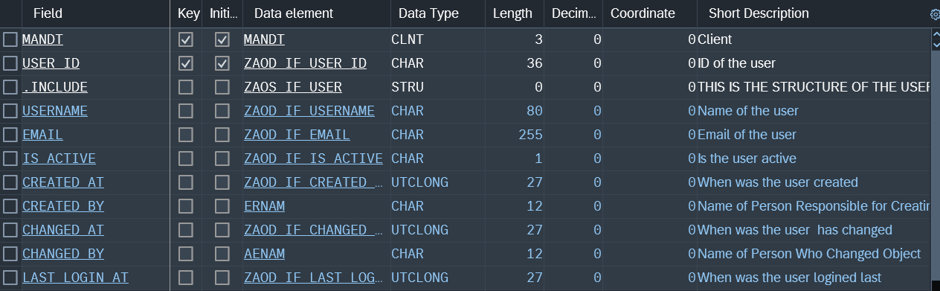
For example, a user’s SAP side representation can be useful, but the entire application logic, UI states, or temporary client-side data are not included.
Step 2: CDS view – convert the table to business view
The next layer is the CDS view. Here, the physical table is no longer seen as a mere container, but as a business model. This is important because we do not want to open the raw board directly to the outside world. The CDS view gives you a more controlled, SAP-side development view over the data.
Simplified example:
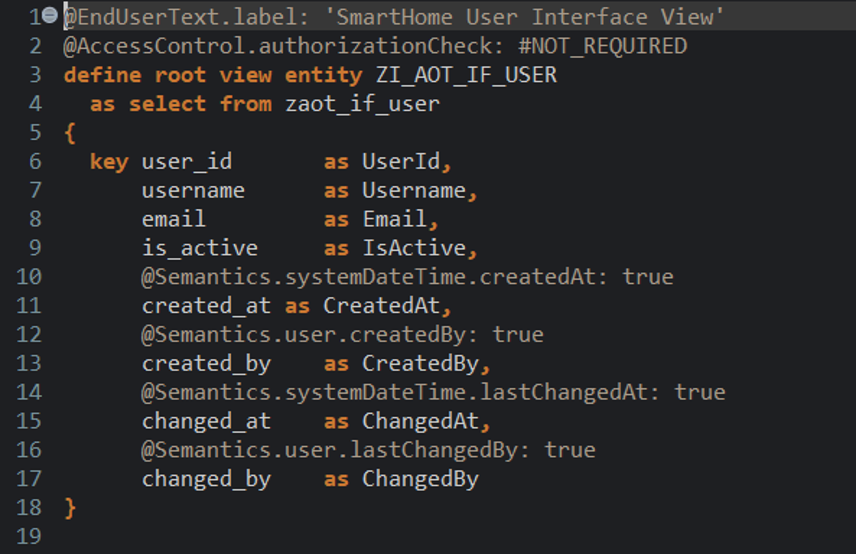
The root view entity indicates that this entity may be the root element of a RAP business object. The field names are not necessarily the same as the names of the physical table fields: in the CDS layer, you can give more business-like, readable names. This is not cosmetic. This is the first layer of abstraction between physical storage and the business model.
Step 3: Behavior definition – what can you do with the object?
The CDS view tells you what the data model looks like. The behavior definition tells you what you can do with it. At this point, the model becomes a real RAP business object. For example, you can define whether creation, modification, or deletion is allowed. This is where the physical table fields and CDS fields are mapped.
Example:
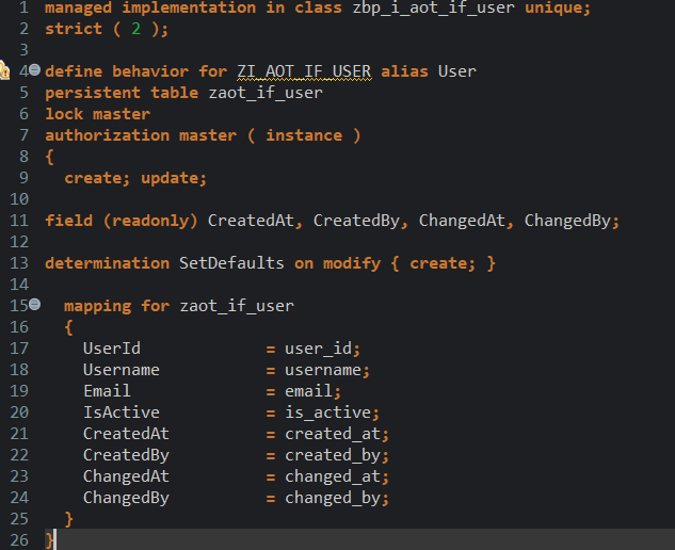
This part is critical from an enterprise point of view. If the external application can create a user but cannot, for example, delete it, then this should not be left to the goodwill of the external client. On the SAP side, it must also be clearly regulated what operations are allowed. So the behavior definition is not just a technical mandatory circle. This is the business object’s behavioral contract.
Step 4: Projection – select the external API model
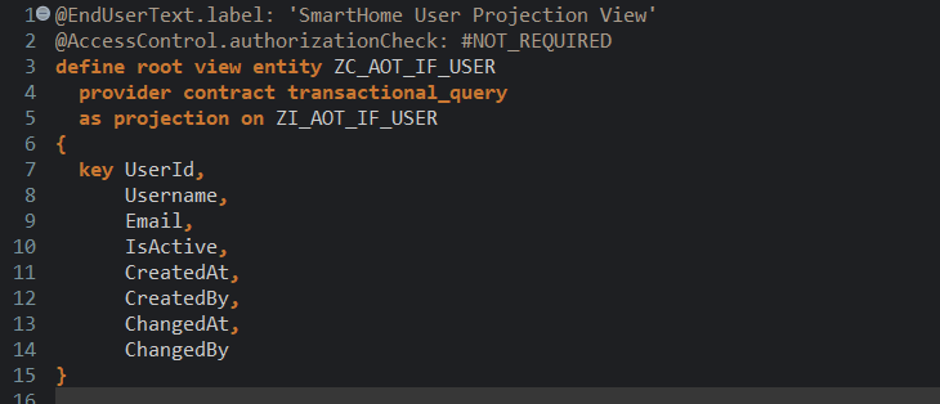
The projection layer may seem unnecessary at first. If you already have CDS view and behavior, why do you need another layer? Because the internal SAP model and the external API model are not necessarily the same.
The internal model may contain fields that are required on the SAP side, but we do not want to expose them to external consumers. Projection gives us the opportunity to designate what the consumer of the service should see.
In the projection layer, we are already thinking in terms of the model intended for the API. This is especially useful if the system is expanded later: for example, with installations, devices or automation events. Projection is not a decorative layer, but a security and architectural boundary. This is where we decide what should become externally accessible from the internal SAP object.
Projection behavior carries the same idea to operations:
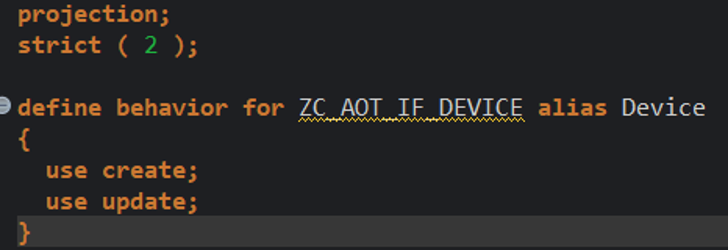
This means that we explicitly allow creation and modification at the published model level. If we don’t want to expose something, we don’t use it here either.
Step 5: Service definition – what do we publish?
The service definition tells you which entities you want to make available as a service. Here we are already very close to what the external application will see. For example, if we expose the projection entity as Users, then that name appears as the consumable entity of the service.
Example:
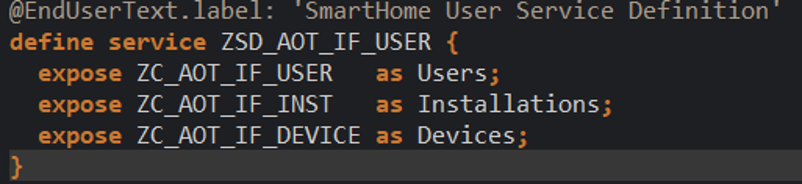
This step is short, but strategically important. This is where it becomes clear that we are not publishing the entire SAP internal model, but a selected service model intended for external consumption.
For later expansion, the same service definition can include, for example, installations or devices, as long as they logically belong to the same service boundary.
Step 6: Service binding – how does this become an OData V4 endpoint?
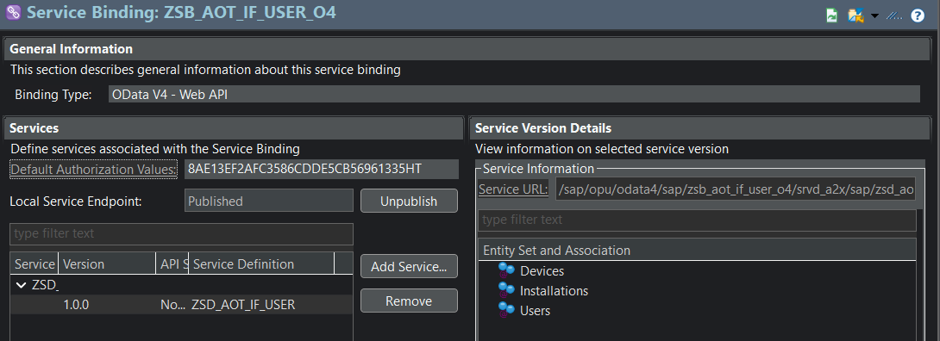
The service definition tells us what we publish. Service binding tells you how. During service binding, we select the technical protocol, such as OData V4. This links the service definition to the endpoint that can actually be called.
Checkpoints after service binding:
- whether binding is active;
- whether the correct service definition is assigned;
- whether we have chosen an OData V4 binding type;
- whether the Users entity set is visible;
- whether the metadata is available;
- whether the service is in a published state.
This is where one of the most important lessons usually comes up: just because objects are activated in ADT, the endpoint does not necessarily mean that it can be accessed from an external client. Technical publishing must also be in order.
The role of SAP GUI: when publishing is also an administrative issue
In certain environments, especially in private cloud, on-premise systems, the service may not be published or verified from ADT. In this case, the status of the V4 service group must also be checked in an SAP GUI-side administration transaction (IWFND/V4_ADMIN).
This was an important lesson in the project as well: the RAP object chain can be created on the developer side, but the external application can only use it if the service is technically published and available.
Therefore, I do not consider the endpoint to be complete until I have at least checked the following:
- activated SAP objects;
- published service binding;
- available metadata;
- successful GET request;
- in the case of a modification operation, CREATE or UPDATE succeeds;
- data appearance verified by readback on the SAP side.
This order saves you a lot of debugging time. If the service does not work stably on the SAP side either, there is no point in looking for the error in the external C# client.
Test before external application
Before connecting the external application, it must first be proven on the SAP side that the endpoint works. The minimum test is a GET request and access to the metadata. Then you can do a CREATE test. If the data is created, you have to check by reading it back to make sure it really appeared on the SAP page.
This is important because additional sources of error appear in the case of the external client: authentication, CSRF token, session/cookie management, payload format, authorization or network problem.
So the correct order is:
- first, operation on the SAP side;
- then external client-side communication;
- finally, it is inserted into an application process.
This thinking is especially important for enterprise integrations. It does matter where the system fails. A well-separated review process will tell you whether it is an object problem on the SAP side, a publishing problem, or an external client-side communication error. Testing on the SAP side will be discussed in the fourth part.
What does this layering give?
The RAP object chain may seem long at first:
Database Table → CDS View → Behavior → Projection → Service Definition → Service Binding → OData Endpoint
From a practical point of view, however, each layer has a separate responsibility.
- The table stores.
- The CDS view gives you a business view.
- Behavior defines the actions.
- Projection designates the external API model.
- The service definition tells us what we publish.
- Service binding creates a technical endpoint.
- And the OData endpoint is the entry point for the third-party application.
This is not unnecessary complication, but controlled system building.
If we handled everything directly at the board level, it would seem faster to start, but the system boundary would be much weaker. RAP tiering helps to avoid confusion between physical storage, business model, published API and technical endpoint.
Lesson learned
The publication of the RAP/OData V4 endpoint is not the result of a single click, but the result of several decisions that build on each other.
The most important lesson for me was that SAP integration should not be started at the endpoint in mind, but at the business object. First, we need to clarify what kind of data makes sense on the SAP side, what operations we want to allow, what we want to publish, and in what technical form an external application can achieve this.
In this structure, the RAP is not an obstacle, but a guardrail. It helps to ensure that the external application does not reach directly inside the SAP, but uses a regulated, business-friendly service.
In the next part of the series, we will look at the same from the side of the external application: why it is not enough for the endpoint to work on the SAP side, and what a C# client should pay attention to during authentication, CSRF token, session management, payload format, and secure data sending.