Successfully merging customers and vendors into a single business partner during the SAP S/4HANA brownfield migration
Are you an IT project manager, SAP key user, or master data administrator facing the challenge of migrating the existing SAP ERP system to SAP S/4HANA as part of a brownfield approach (system conversion)? Then there is no way around Customer-Vendor Integration (CVI). CVI is one of the central and often most underestimated preliminary projects on the path to the new ERP world.
In this article, we examine a particularly critical scenario in detail: the consolidation and merging of companies that, for historical reasons, are managed in ECC as both customers (debitors) and suppliers (creditors) into a single, central SAP business partner.
The Starting Point
In SAP S/4HANA, the SAP business partner data object is the mandatory, strategic, and leading master data object for managing customers and suppliers. Due to this harmonized data architecture, the isolated master data objects for customers and vendors familiar from SAP ERP have been replaced by this harmonized data architecture. Consequently, the business partner now serves as the central entry point (single point of entry) for creation, editing, and display.
For a brownfield migration, this represents a significant technical constraint. A system conversion from SAP ERP to SAP S/4HANA is simply not possible if the source system has not been fully converted to the Business Partner model. The CVI is the automated process that synchronizes your existing customer and vendor master data and assigns an SAP Business Partner to each data record. You can read more about CVI here in another blog post.
Why is data quality so critical to success here? Wenn Sie den sogenannten Software Update Manager (SUM) für die eigentliche SAP-S/4HANA-Konvertierung starten, führt das System strikte Prüfungen durch. Ermittelt das System während dieser SUM-Phase nicht synchronisierte Kunden- oder Lieferantenstammdaten, die nicht mit einem Geschäftspartner verknüpft sind, stoppt es den Umstellungsprozess sofort und gibt eine Fehlermeldung aus.
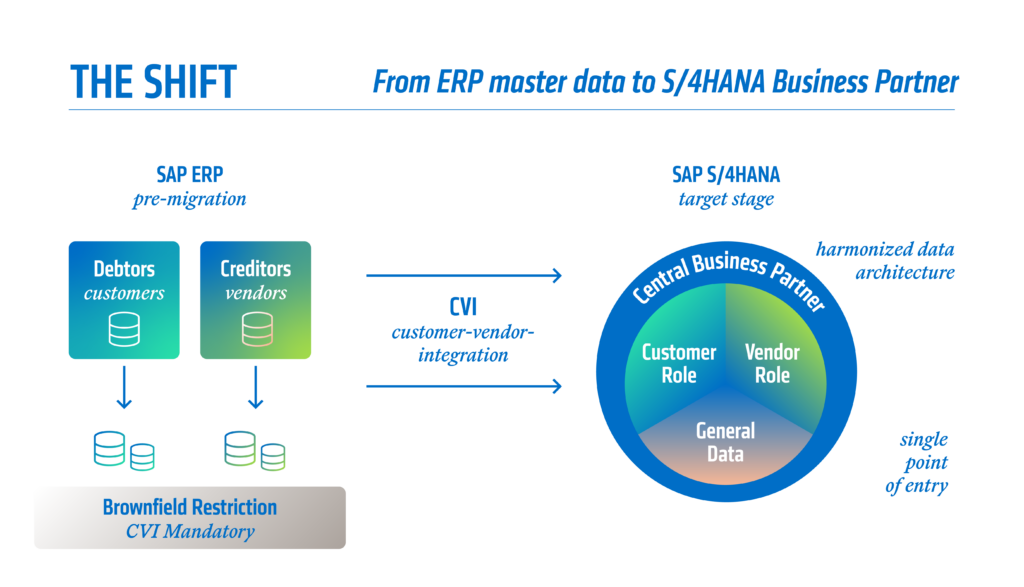
Furthermore, during synchronization into the business partner system, master data undergoes far stricter control mechanisms and validation rules than you are accustomed to when creating records in the old SAP ERP system. A master record that could be saved without issue in the old system may cause an error during CVI due to inconsistent data or missing required fields, thereby preventing the conversion. A dedicated pre-project for CVI is therefore absolutely essential to ensure a smooth transition.
The Core Problem: Merging Accounts Receivable and Accounts Payable into a Single Business Partner
Redundant master data is a classic challenge in almost every mature SAP system landscape. In reality, the same legal entity often acts as both your customer and your supplier. In the classic SAP ERP data model, this inevitably led to the creation of two completely independent master records in different transactions: a customer master and a vendor master.
To map this logical relationship in the ERP system, the two master records are often linked manually. This is done in the control data of the respective maintenance transactions by entering the vendor number (field LIFNR) in the customer master and the customer number (field KUNNR) in the vendor master.
The challenge with this legacy ERP logic is that the system does not perform any comparison or consistency check of general data (such as name, address, or tax ID) between the customer and the vendor when establishing this link. It is technically entirely possible for the customer and the linked vendor to have, for example, completely different addresses, differing spellings, or different tax ID numbers. Furthermore, the ERP system does not consistently check for multiple assignments, meaning that master data from different companies may be linked incorrectly or that links are created only unilaterally.
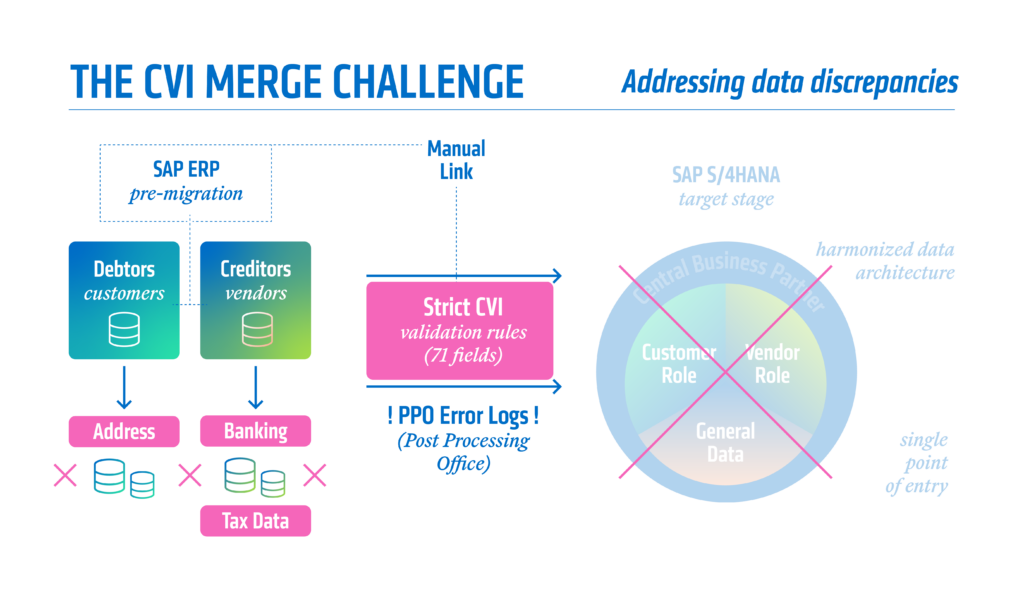
With the introduction of SAP S/4HANA and the CVI, a potential strategic goal is now to assign each legal entity to exactly one business partner. This business partner then assumes both the customer and supplier roles through corresponding roles. If the CVI now attempts to synchronize your historically manually linked—but often substantively divergent—customer and supplier pairs into a single shared business partner, the strict validation rules of the new data model come into play. If there are discrepancies in the master data, the merger will inevitably fail, and the system will generate error logs in the so-called “Post Processing Office” (PPO).
What to keep in mind: Address data, bank details, and tax ID numbers
In order for the system to be technically capable of merging the master data of a customer and a vendor error-free under a single business partner number, certain mandatory requirements must be met. These technical hurdles often require significant effort from the business department and IT in advance to clean up the data. You must pay particular attention to the following three main areas:
1. Exact Match of Address Data
The customer and supplier must have exactly the same mailing address. The SAP system does not tolerate any discrepancies here. A classic practical example: In the master record, the street is maintained as “Alsterdorfer Strasse 110.” However, in the linked master record, the house number is entered separately from the street field as “Alsterdorfer Straße” (with “ß” instead of “ss”). The system detects an error and prevents the merger. Such subtle differences must be harmonized before synchronization.
2. Consistency of Bank Details
The bank details in both master records must be identical. A typical error message during the merge is “Bank account with ID X already exists.” This error occurs when the bank details of the customer and the vendor have the same partner bank type but differ in the remaining bank account information (e.g., IBAN or account number). The rule is: Different bank details must not use the same partner bank types.
3. Consistency of Tax Data and Tax ID Numbers
Tax data and tax numbers must be consistent in both linked master records. In SAP S/4HANA, each tax ID in the business partner is assigned a specific tax ID type (e.g., DE0 for the German VAT ID), which represents a significant change. If these types are missing or if the VAT IDs entered for the customer and vendor differ, the CVI process aborts.
In total, SAP checks up to 71 different fields for consistency when merging customers and vendors. If even one of these fields differs, a merger is technically not possible at first.
What can help with master data cleansing: The CVI_LEDH tool
In the past, cleaning up this data was a Herculean task. In the event of an error, users had to switch to the old transactions XD02 (Change Customer) and XK02 (Change Vendor), manually compare the fields of both master records, and align them. This time-consuming process was hardly efficient to manage in large-scale projects with thousands of linked master data pairs.
To resolve this pain point, SAP now provides a powerful tool: the Data Harmonization Report for Legal Entities. This report can be accessed using transaction code CVI_LEDH.
This tool revolutionizes the data cleanup process prior to CVI. The report clearly lists all customer and vendor data records that form a legal entity pair (i.e., are linked to each other) but whose reconciliation would fail due to data discrepancies. The system specifically compares the error-prone areas of address, tax ID numbers, and bank details.
The significant advantage of this cockpit: It offers a direct correction option for every detected discrepancy by defining a “Leading Entity.”
What this means in practice
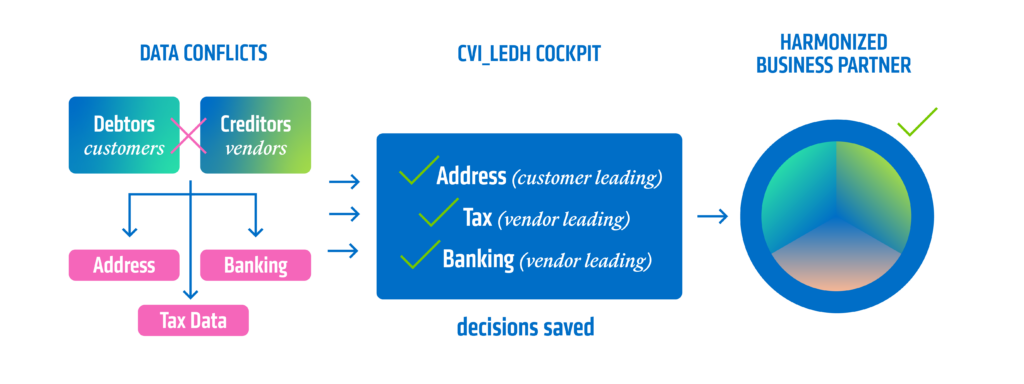
The starting point is the master data discrepancies mentioned above. Now, the following is selected:
Leading Address: A dropdown menu is used to select whether the customer’s or vendor’s address is correct and should be adopted into the business partner during synchronization.
Leading Tax ID: You specify which master record is the leading one with regard to tax data. Only the tax data from the leading master record is transferred. This applies even if, for example, the VAT ID is maintained in one master record and Tax ID 1 in the other.
Primary Bank Details: This determines whose bank details will serve as the basis for the new business partner. If different bank details have been maintained in both master records and:
- no partner bank type is specified in either master record,
- a partner bank type is specified in only one master record,
- partner bank types are specified in both master records, but they differ,
then all the underlying bank details are copied over. In the scenario “same partner type – different bank details,” the previously mentioned error “Bank details with ID X already exist” occurs, which must be corrected manually.
When these decisions are made and saved in the report, the system stores this information. If the actual mass synchronization is then started (via transaction MDS_LOAD_COCKPIT), the CVI interface uses exactly these specifications. The data is automatically harmonized based on the selected leading entity. In this way, the system creates the new business partner in a single step and without errors, despite the master data originally being maintained differently in KNA1 and LFA1. Working in the background here is the Business Add-In (BAdI) CVI_CUSTOM_MAPPER in combination with the implementation CVI_MAP_LEGAL_ENTITY, which technically controls this complex reconciliation logic.
Important Note
However, transaction CVI_LEDH only assists with the initial synchronization of master data, i.e., during the mass conversion of existing customers and vendors into business partners. Once all historical data has been converted and the CVI project has been completed, the creation or modification of a business partner takes place only in the background as soon as a customer or vendor master record is created. However, if a customer and vendor are to be linked to the same business partner here, care must be taken during creation to ensure that the master data is technically linked (KNA1-LIFNR or LFA1-KUNNR) and that the address data, tax data, and bank details match exactly. It is not possible here to use the CVI_LEDH transaction to define leading objects.
What the master record looks like in the end
Once the preparatory work, harmonization via CVI_LEDH, and mass synchronization have been successfully completed, the target state is achieved. Redundant data storage is a thing of the past.
After the system conversion to SAP S/4HANA, this entity is maintained exclusively centrally via the BP transaction (Edit Business Partner) or via Fiori apps. End users no longer use different transactions but find all information consolidated in one place.
The new business partner master record is now functionally and tabularly well-structured:
- Central Data (Table BUT000): The harmonized, general data such as name, legal form, address and communication data (Table BUT020), as well as bank details (Table BUT0BK) and tax numbers (Table DFKKBPTAXNUM), are stored here without redundancy under the base role 000000 (Business Partner General). This data only needs to be maintained once, regardless of how many functions the company performs for you.
- Rollenspezifische Daten: Die spezifischen Steuerungsdaten für die jeweiligen Fachbereiche werden dem Geschäftspartner über sogenannte Geschäftspartner-Rollen hinzugefügt.
- If the company is to act as a customer in Financial Accounting (FI), the role FLCU00 (Customer) is assigned, which controls the company code data.
- For logistics processing in Sales and Distribution (SD), the business partner is additionally assigned the role FLCU01 (Customer) for the sales area data.
- If the company acts as a vendor, the role FLVN00 (Vendor) controls the vendor data at the company code level.
- For ordering processes in Purchasing (MM), the role FLVN01 (Vendor) is assigned, which contains the purchasing organization data.
Technical Background: Although the business partner is the leading front-end object in the S/4HANA system, the classic tables from the ERP world (KNA1, KNB1, LFA1, LFB1, etc.) continue to be updated in the background for compatibility reasons. The technical link between the unique business partner GUID (from BUT000) and the historical customer or vendor numbers is permanently ensured via the link tables CVI_CUST_LINK and CVI_VEND_LINK.
Conclusion
Customer-Vendor Integration is far more than just a preliminary technical check. The consolidation of accounts receivable and accounts payable forces companies to ruthlessly expose and clean up their often-deficient master data quality. Use tools such as the harmonization report CVI_LEDH to drastically accelerate this process. A properly executed CVI is not only the technical key to S/4HANA conversion but also the foundation for future-proof, digitized, and efficient business processes.
Do you need support with cleaning up your master data or strategic CVI implementation? Our consultants at adesso business consulting will guide you in confidently overcoming the hurdles of data harmonization. We help you reduce complexity and make your processes fit for the digital future. Feel free to reach out to us so we can pave the way to SAP S/4HANA together.