Migrating to SAP S/4HANA using the brownfield approach (“system conversion”) presents companies with one of the most complex challenges in their ERP history: the mandatory transformation of their historical master data. At the heart of this transformation is Customer Vendor Integration (CVI) and the introduction of the business partner in the background in an ECC system. Whereas the SAP business partner in the ERP Central Component (ECC) 6.0 world was often only an optional construct for special modules (e.g., SAP Treasury or SAP CRM), in S/4HANA it has become an indispensable, leading object for all master data-related processes. The classic transactions and data models for accounts receivable (FI-AR) and accounts payable (FI-AP) are becoming obsolete and are technically encapsulated by the BP.
This blog post provides a detailed analysis of the CVI process, structured according to the proven adesso process model (phases 0 to 7). It is aimed at solution architects, technical project managers, and master data managers who need to understand that CVI is not a purely technical conversion, but a massive data quality project that dictates the critical path of the entire S/4HANA migration. Failure of CVI synchronization is one of the most common reasons for the termination or postponement of S/4HANA projects, as the Software Update Manager (SUM) rigorously blocks the technical upgrade process without successful CVI.
The following analysis not only highlights the obvious customizing steps, but also delves deep into the mechanisms of synchronization, the pitfalls of number range logic, the possibilities of BAdI extensions, and post-migration operating scenarios.
It is based on the adesso business consulting business partner process model:
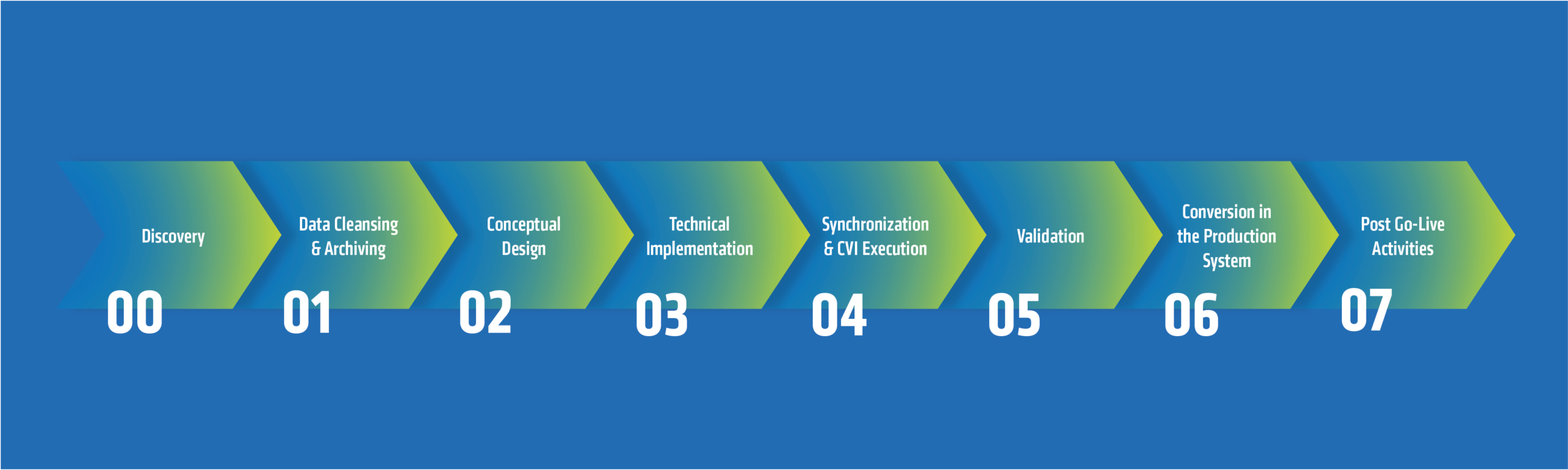
Phase 0: Discovery
Phase 0 marks the start of the migration project. In a brownfield environment, the legacy system has often grown organically over decades. This history results in high variance in data quality, obsolete customizing fragments, and inconsistent business processes. Therefore, the discovery phase serves to take a thorough inventory and identify showstoppers before significant resources are invested.
The first step in any S/4HANA initiative is to perform the SAP Readiness Check. In the specific context of CVI, this check identifies the relevant simplification items that reveal the discrepancy between the actual ECC status and the target S/4HANA status. The business partner is one of the most prominent and consequential simplification items in S/4HANA (S4TWL – Business Partner Approach (2265093)).
A detailed analysis must clarify the following aspects, among others:
- Account group inventory: Which customer and vendor account groups are in use? Often, account groups that were created years ago for temporary purposes and whose use is unclear can be found in the system. A detailed analysis is worthwhile here to clean up “data garbage”, as account groups were often adjusted over time (e.g., number ranges changed or replaced).
- Industry-specific enhancements (IS): Are industry solutions such as IS-U used? These modules often already used the business partner in ECC, but in a different constellation or synchronization direction. This can lead to massive conflicts if the existing BP implementation is not compatible with the new CVI logic of the S/4HANA core.
- Data volume: How large is the volume of master data? The number of data records (e.g., 50,000 vs. 5 million) has a direct impact on the synchronization runtime and the dimensioning of the hardware for parallel processing.
Difference between greenfield and brownfield
A fundamental difference between greenfield and brownfield approaches lies in the handling of legacy data. A brownfield migration basically implies that all master data existing in the system must be technically converted unless it is archived. There is no way to selectively migrate only the “good” data, as the database tables (KNA1, LFA1) are physically converted.
Therefore, a clear distinction must be made in phase 0:
- Active data: Master data that has been used in open items, current contracts, or orders from recent fiscal years. This data must be transformed to a high standard of quality.
- Inactive data: Master data that has not been posted for years but has not (yet) been archived for technical or legal reasons. Here, strategies must be developed to get this data through the “wall of conversion” with minimal effort, without launching expensive cleanup projects.
Experience shows that data quality is the biggest risk factor. Brownfield projects often lack the time for a full-fledged archiving project, which can take months. Here, a strategic decision must be made in phase 0: archiving vs. “rubbish” groups.
The concept of “rubbish” or “collector” account groups (e.g., Z999) offers a pragmatic solution. The strategy is to move all master records identified as obsolete to a special account group. For this group, all field checks (such as bank data validation, tax IDs, postal code checks) are deactivated in later CVI customizing via BAdI or customizing. This allows the technical hurdle of CVI to be overcome without having to laboriously clean up historical data dumps. This decision must be made early on, as it has a massive impact on the activities in phases 1 and 2.
Phase 1: Data cleansing and archiving
After the initial analysis, phase 1 begins with the operational preparation of the database. The credo of this phase is to avoid “garbage in, garbage out,” as data quality significantly determines the success and duration of the subsequent synchronization.
As indicated in phase 0, reducing the volume of data is the most effective way to minimize CVI errors and shorten the upgrade time. Data that no longer exists (because it has been archived) does not need to be converted, checked, or mapped.
The remaining active data must be rigorously cleaned up. CVI uses the BP’s Business Address Services (BAS), which apply significantly stricter validation rules than the old KNA1/LFA1 tables..
| Quality dimension | Typical problem in ECC | Consequence in the CVI | Cleanup measure |
| Duplicates | Creditor X and debtor X are the same company, but are not linked. | This results in two separate BPs instead of one integrated BP. | Linkage analysis and setting of the “Customer” field in the vendor master (and vice versa). |
| Address data | Outdated postal codes, missing regions, incorrect country formats. | The CVI synchronization run aborts with an error message (BAS validation). | Use of address validation services (e.g., SAP Data Quality Management or CDQ). |
| Tax data | Duplicate or invalid VAT ID. | By default, BP does not allow duplicate tax IDs (uniqueness check). | Clean up tax IDs or adjust message control (be careful with compliance!). |
| Bank | Invalid IBAN formats or bank codes. | Synchronization errors. | Validation against bank directories. |
| Titles | “Salutation” field empty or unstructured (e.g., “Company” in the name field). | BP requires a salutation to determine the type (person/organization). | Define mapping rules or enrich master data. |
The CVI_PRECHK (Master Data Consistency Check) report is the most important tool in this phase because it simulates the creation of a business partner based on the current debtors/creditors and checks them against the BP’s customizing rules. In addition, adesso business consulting has developed its own “Q-Check Tool” to support data cleansing during the initial setup. You can read more about this here in the following blog post.
Phase 2: Design
While data cleansing is underway, the technical foundation must be laid in phase 2. Here, business requirements are translated into SAP configurations, and errors in this phase are often irreversible or can only be corrected with enormous effort.
The business partner (BP) is the leading object. It strictly separates general data (name, address) that applies to all roles from role-specific data.
Among other things, the business partner groupings, business partner roles, mandatory fields in the business partner, salutations, industry systems, etc. must be defined. Assigning numbering logic for the business partner is one of the most complex and discussion-intensive topics in CVI. Among other things, it must be decided which account groups are linked to which business partner groupings, whether master data should be merged or kept separate, and which business partner types (e.g., person or organization) should receive
Phase 3: Technical implementation
In phase 3, the ECC system is made technically “CVI-ready.” This includes importing notes, activating business functions, and implementing extension logic based on the design from phase 2.
SAP has introduced the “CVI Cockpit” to consolidate historically scattered transactions and reports in one central location. Here, customizing can be performed centrally in one place.
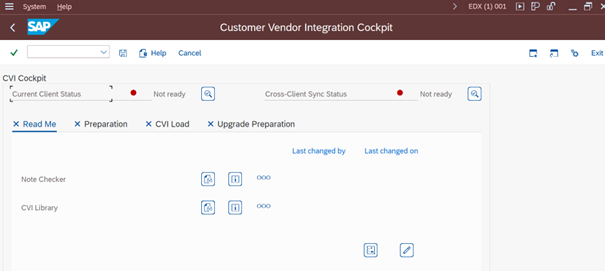
SAP’s standard mapping rules cover approximately 80-90% of requirements. For the remaining cases, especially when using Z fields (customer-specific fields) in KNA1/LFA1, business add-ins (BAdIs) are necessary.
Important BAdIs in the context of CVI:
- CVI_CUSTOM_MAPPER / CVI_MAP_LEGAL_ENTITY: This BAdI is the central entry point for customer-specific field mappings.
- CVI_MAP_TITLE: Used for mapping titles.
- CVI_MAP_BANKDETAILS: Enables control over how bank details are transferred.
For legacy data that cannot be cleaned up and has not been archived (see Phase 0), SAP offers the option of temporarily suspending certain checks, but this function is a double-edged sword. It enables the technical conversion, but results in inconsistent data ending up in S/4HANA. This can later block operational processes (e.g., payment runs that abort). It is therefore strongly recommended that this suppression be applied only selectively for the defined “rubbish” groups and not globally.
Phase 4: Synchronization and CVI execution
This is the “hot phase” in the ECC system before the actual conversion, and the goal is to create a business partner for each existing customer and vendor and to fill the link tables.
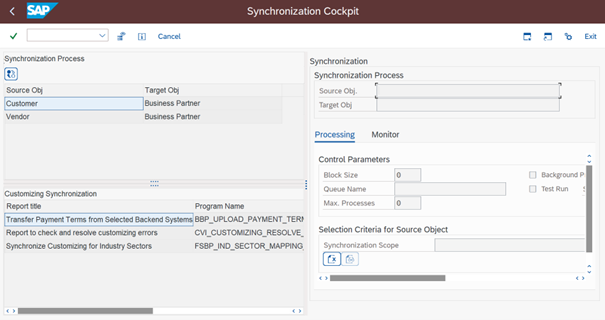
Mass synchronization is performed using the synchronization cockpit (transaction MDS_LOAD_COCKPIT). This tool orchestrates the creation of the BPs.
Despite all the preparations, errors will occur. The Post Processing Office (PPO) is the central monitoring tool for this.
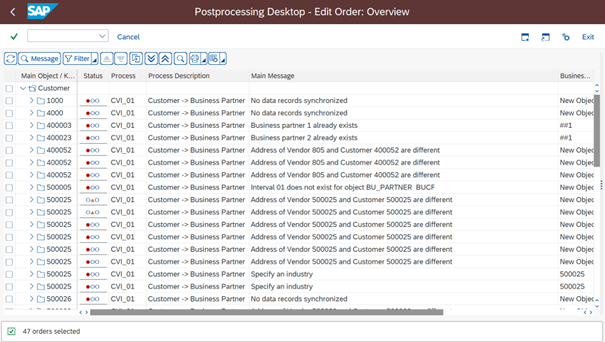
The workflow in the PPO is iterative: errors are displayed and analyzed. The master data is then corrected (e.g., via XD02/XK02), or the customizing is updated. After the correction, the synchronization run for the affected objects must be repeated. Alternatively, the PPO job can be repeated directly in the PPO.
This cycle (“Fix -> Retry”) can take weeks, depending on the data quality, and must be taken into account in the project plan.
In addition to traditional B2B partners, contact persons (customer representatives) often need to be synchronized as well. These are created as BPs of the “Person” type and linked to the organization BP via a relationship (“Is contact person for”).
Phase 5: Validation and testing
Even after the synchronization cockpit shows “green,” you cannot blindly rely on it. That is why phase 5 is dedicated to quality assurance and ensures that the system meets the strict criteria of the SUM update.
It must be ensured that the number of business partners is plausible and correlates with the number of source objects.
- SQL checks & reports: Comparison of entries in KNA1 (customers) vs. BUT000 (business partners). It should be noted that the numbers are not necessarily identical (e.g., due to duplicate merging), but must be explainable.
- Link tables: The link is stored in the tables CVI_CUST_LINK (customer <-> BP) and CVI_VEND_LINK (vendor <-> BP) as well as CVI_CUST_CT_LINK (contact person). Every active customer must have an entry here. Gaps in these tables are an alarm signal and indicate failed or unperformed synchronizations.
In addition, random checks of complex data constructs are essential. These include, among others:
- Partner roles: Have all partner roles (goods recipient, invoice recipient, payer) been correctly transferred to the corresponding BP roles and relationships?
- Address versions: Are international address versions (e.g., Kanji in Japan, Cyrillic in Russia) correctly mapped in the BP?
- Bank details: Have SEPA mandates remained correctly linked?
The Software Update Manager (SUM) performs a hard check (simplification item check) at the start of the conversion. If the CVI is incomplete (i.e., there are debtors without a BP link), the SUM aborts and refuses to start the downtime.
Phase 6: Conversion in the production system
Once the data has been validated in the quality assurance system and the processes have been tested, the customizing settings can be transferred to the production system. The final data conversion then takes place.
Phase 7: Post-go-live activities
Since there may be a considerable amount of time between the business partner conversion and the actual SAP S/4HANA conversion, the CVI initially only runs technically in the background. As soon as a new customer or vendor master record is created, the CVI generates the business partner master record. This can lead to errors, which must be regularly reviewed and corrected in PPO, even after going live.
Once the conversion to SAP S/4HANA has been completed, there are still a few tasks to be carried out in the CVI area. These include assigning authorizations for maintaining business partner master data (GUI and/or Fiori), changing the synchronization direction (BP -> customer/BP -> vendor), and also using other innovations (e.g., relationship management, multiple addresses, SAP S/4HANA Credit Management).
Conclusion and summary
Customer Vendor Integration (CVI) is much more than a technical task; it is the fundamental data project of the S/4HANA transformation. A detailed look at phases 0 to 7 makes it clear that success is not decided on the go-live weekend, but months before.
Those who take shortcuts here or dismiss the issue of data quality as an “IT problem” will pay the price in the form of massive project delays, exploding PPO error lists, and inconsistent processes in the new system. The brownfield approach forces companies to settle their “technical debt” in the master data area – a necessary investment in order to be able to utilize the full performance of S/4HANA.
Are you facing the challenge of an S/4HANA brownfield migration and need support with complex customer vendor integration? The experts at adesso business consulting will guide you safely through all phases – from analysis to go-live. Contact us for a no-obligation initial consultation and benefit from our many years of project experience in SAP transformation.