The transition from SAP GUI to SAP Fiori is far more than just a design update. In the S/4HANA world, the user interface becomes a strategic driver of digital transformation. Instead of mere data entry, Fiori’s role-based approach enables a fundamental redesign of work: processes flow more efficiently, and decisions are made based on real-time data.
The Paradigm Shift: From Function to Role
To understand the scope of this change, we must look at its historical development. For decades, the SAP GUI was the backbone of SAP systems and was designed in an era when functional depth and maximizing input speed for experts were the top priorities. The user interface was system-centric, meaning that users had to understand the system’s architecture—such as the module structures of FI, CO, MM, or SD—to perform their tasks. Navigation was primarily done via transaction codes, or T-codes for short, which experienced users often memorized. A single T-code, such as VA01 (Create Sales Order), could contain hundreds of fields, of which often only a fraction was relevant for a specific task. This “one T-code for everything” mentality led to enormous functional density, but also to a steep learning curve and a high cognitive load for occasional users.
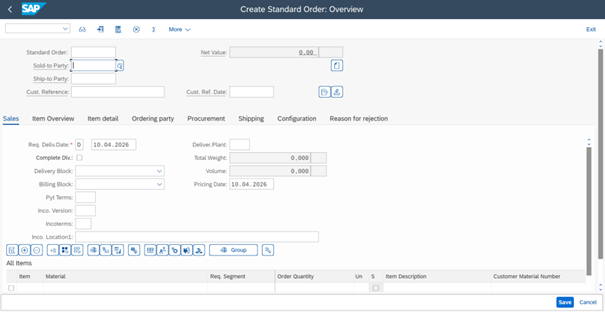
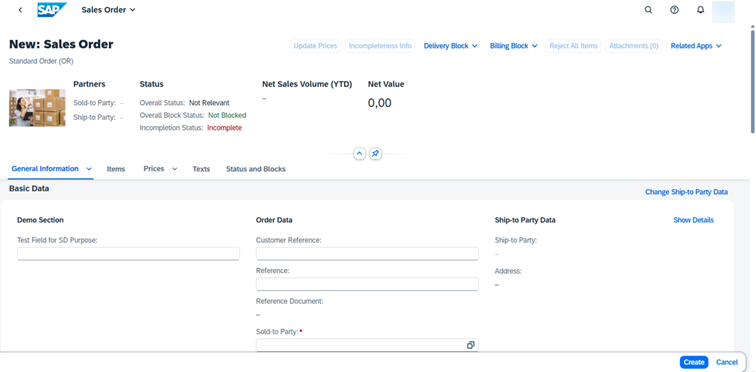
SAP Fiori, on the other hand, breaks with this tradition and introduces a user-centered design paradigm. The design is based on the principle of task orientation. Instead of providing a universal transaction for every conceivable scenario, Fiori breaks down complex business processes into small, task-oriented apps. Each app is tailored to a specific user role and displays only the information and functions that are absolutely necessary to complete the respective task. This approach drastically reduces complexity and enables intuitive operation that is more reminiscent of modern consumer apps than of classic enterprise software.
The technological foundation of this shift is the SAPUI5 framework, which is based on open web standards such as HTML5, CSS3, and JavaScript. This enables a responsive design that ensures the applications function equally well and look appealing on desktops, tablets, and smartphones. While the SAP GUI required a local installation on the end device and was tightly bound to the operating system, SAP Fiori is fully web-based and device-independent. This marks the transition from a rigid, location-bound approach to a flexible, mobile way of working.
Comparison of Design Principles and Technological Foundations
| Feature | SAP GUI (Classic) | SAP Fiori (Modern) |
| Design focus | Function-oriented (“What can the system do?”) | Role-based (“What do users need to do?”) |
| Main Navigation | Menu hierarchies and T-codes | Apps, search, and notifications |
| Interaction model | Form-based, high data density | Task-focused, information-driven |
| Technology | ABAP Dynpro (proprietary) | SAPUI5 (HTML5, JavaScript, OData) |
| Deployment | Local desktop installation | Web browser |
| Customization | Limited to technical variants | High level of customization by users |
| Analytics | Separate from the operational process | Embedded (real-time insights) |
This technological leap also enables the integration of “embedded analytics.” While users in the SAP GUI often had to switch between operational transactions and separate reporting tools, Fiori brings analytical insights directly into the workflow. Buyers can see right on their home screen, via dynamic tiles, how many orders are overdue, and can jump directly from the analysis to processing.
Possible Implementation Strategies: Fiori Only, Fiori First, or Mixed Approach
For companies planning to migrate to S/4HANA, the decision regarding the future UX strategy is of central importance for the project budget, the timeline, and subsequent acceptance within the business unit. There are various strategic paths that can be chosen depending on company size, IT maturity, and user structure.
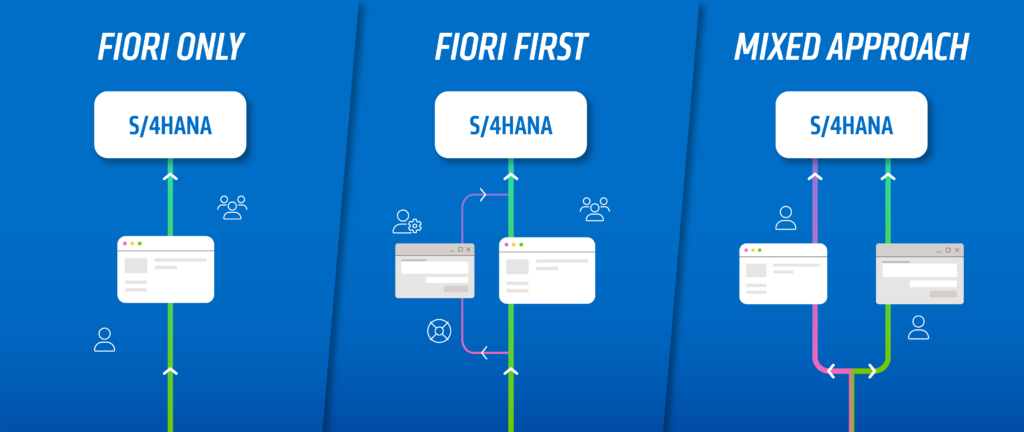
Fiori Only: The Vision of Maximum Modernization
The “Fiori Only” strategy aims for a complete replacement of the SAP GUI. In this scenario, all users interact with the system exclusively via the Fiori Launchpad. This is the most radical approach, but one that consistently leverages the benefits of the new environment. It is the standard for organizations opting for the S/4HANA Public Cloud, as technical access via the classic GUI is no longer supported there, but it is also feasible for the Private Cloud and on-premise deployments.
The advantages lie in a drastically simplified IT infrastructure, as GUI clients no longer need to be deployed and maintained. Additionally, the “Clean Core” principle is promoted, as extensions are primarily implemented using modern web technologies and the SAP Business Technology Platform (BTP). The critical question with this approach, however, remains the functional depth. Despite SAP’s enormous development efforts, native Fiori apps in on-premise environments do not yet cover every single niche scenario that has matured over decades in the SAP GUI. For companies with highly specialized processes in manufacturing or deep finance, a pure Fiori approach can therefore mean functional compromises or require expensive in-house development.
Fiori First: The Pragmatic Standard
In most S/4HANA Private Cloud or on-premise projects, “Fiori First” is the chosen approach. Here, SAP Fiori is the leading interface and the primary entry point for all users. If a native Fiori app exists for a task, it must be used. The SAP GUI is retained only as a technical backup for highly specialized expert tasks or for processes for which SAP has not yet provided an adequate Fiori app.
This approach offers an excellent balance between modernization and functional reliability. Users get accustomed to the new Launchpad, benefit from intelligent search and notifications, but retain access to the familiar depth of functionality from the old system in exceptional cases. Technically, this is often achieved by visually harmonizing the remaining GUI transactions and integrating them directly into the Fiori Launchpad, so that users do not have to leave the environment.
Mixed Approach: Differentiation by User Groups
The “Mixed Approach” is a deliberate segmentation strategy that recognizes that different user types have different requirements for their tools. Here, the user base is typically divided into three categories:
- Occasional users: Employees who use the system only sporadically (e.g., for time tracking, travel expenses, or approvals). Fiori is ideal for them, as it requires no training and minimizes the error rate.
- Expert users: Employees in accounting or materials management who process large volumes of data. Here, the SAP GUI (or WebGUI) is often deliberately used, as the speed of keyboard operation and the density of information are often still superior for specialized tasks.
- Technical users: Administrators and developers continue to use the GUI for in-depth system configurations, as the corresponding Fiori equivalents are often designed more for business configurations.
| Strategy | Suitability | Hauptvorteil | Main Risk |
| Fiori Only | Public Cloud, Startups, Standardized Processes | Minimal TCO, maximum innovation | Functional gaps in specialized processes |
| Fiori First | Transformations (on-prem/private cloud) | Modern UX with guaranteed functionality | Greater effort for role maintenance |
| Mixed Approach | Large corporations, complex production | High efficiency for power users | Inconsistent user experience |
Critical Assessment: The Light and Shadow of the Fiori World
As an experienced consulting firm, it is important to balance the marketing hype with the reality of projects. SAP Fiori is undoubtedly the future, but the path to it is paved with challenges that are often underestimated. An honest assessment shows that native Fiori apps (still) lag behind the flexibility of their GUI predecessors in some areas.
An interesting phenomenon is that the intended simplicity sometimes backfires when too much information is crammed into a single web app. A striking real-world example is the app for managing business partners. While the GUI transaction may seem outdated, its tabbed structure makes it easy for experts to navigate. The corresponding Fiori app is often perceived by users as “perplexing,” as it works with extremely long lists, numerous jump labels, and a high number of fields that are more difficult to keep track of in a browser than in a dedicated desktop application.
The technological shift requires a massive change in employees’ mindset. Users who have been blindly entering their T-codes for over 20 years often feel held back at first in a click-centric web interface. They perceive the new “simplicity” as patronizing or a loss of control. IT leaders must understand this: The transformation is not an IT project, but a change in corporate culture.
Successful change management must shift the focus from mere data entry to information gathering. The added value of Fiori does not lie in creating an order faster than in the GUI (which is often not the case), but in the fact that buyers can use proactive alerts and integrated analytics to identify which orders need to be created to avoid an impending supply bottleneck. This shift from “data entry clerk” to “data-driven decision-maker” is at the core of the Fiori strategy.
Technical Reality: Building the Bridge Between Worlds
In the practical reality of on-premise and private cloud environments, the coexistence of the GUI and Fiori is the norm. The technical solution for uniting these worlds is “SAP GUI for HTML” (also known as WebGUI). It enables the execution of classic screen transactions directly in the web browser without the need to install a local GUI client.
Integration occurs seamlessly into the Launchpad interface. For end users, a GUI transaction then appears as just another tile. Technically speaking, clicking the tile calls a service that converts the backend screens into HTML code in real time. Thanks to visual harmonization, these legacy interfaces adapt in color and style to modern Fiori apps.
Public Cloud Fact Check: No Longer a Choice
For companies choosing the S/4HANA Cloud Public Edition, the debate over GUI vs. Fiori has already been settled. In this model, the web browser is the only access point. The Fiori Launchpad is the exclusive portal for all business activities.
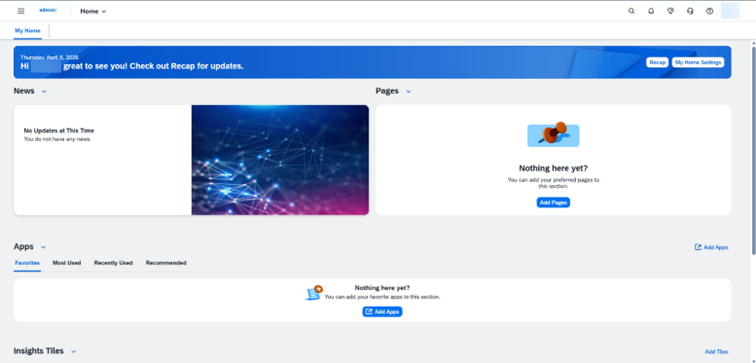
The Public Cloud enforces a standardization that many IT managers must first come to terms with. There is no access to specific, classic ABAP or administration tools via the local GUI. Everything is handled through web-based Fiori apps.
- Low maintenance: Since SAP manages the entire infrastructure and updates, the effort required for GUI distribution is completely eliminated.
- Standard processes: Since customization options are limited at the core, business processes must adapt to the delivered Fiori apps, not the other way around. This follows the “fit-to-standard” principle.
- Future-proofing: Innovations, such as new AI features or process automations, are rolled out first—and often exclusively—for the Fiori interfaces in the public cloud.
In the public cloud, it’s also clear where things are headed: The Launchpad is becoming increasingly intelligent. With the “Spaces and Pages” concept, app structuring becomes even more intuitive, and features like “My Home” allow users to bundle their most important tasks, KPIs, and news on a personalized home screen.
The Strategic Role of UX in Project Success
Experience shows that S/4HANA projects that view UX as a mere “cosmetic enhancement” at the end of the project often fail due to a lack of user acceptance. The new user interface must be viewed from the outset as an integral part of business transformation.
A modern UX is not an end in itself. It directly contributes to the hard metrics of the business case. Productivity increases by reducing the number of clicks and avoiding media breaks. Training costs drop significantly thanks to intuitive guidance. Above all, however, the error rate decreases, as Fiori actively guides users through the process and prevents incorrect entries through real-time validation.
The outlook for the coming years shows that Fiori is evolving from a pure click-based interface into an intelligent assistant. The integration of Joule, SAP’s AI co-pilot, will once again revolutionize the way we work. Instead of navigating through menus, users will speak or chat with their system. Joule will understand complex queries in natural language and directly launch the appropriate Fiori apps or even complete tasks autonomously.
Recommendations for Decision-Makers
To ensure a successful transition, organizations should prioritize the following steps:
- Early role definition: UX doesn’t start with design, but with understanding roles. Who does what in the system? Only those who know their roles can select the right Fiori apps.
- Transparent communication: Be honest about functional differences. Explain to experts why they may need a few more clicks in some cases, but at the same time show them the massive benefits of the new analytical capabilities.
- Technical groundwork: Invest in a solid front-end infrastructure. A slow Fiori app is the surest way to nip acceptance in the bud. Performance optimization of OData services and proper configuration of the Web Dispatcher are critical success factors.
- Iterative Rollout: Start small. Use standard apps for simple processes like approvals, and then gradually expand the Fiori portfolio to more complex areas.
In summary: There is no alternative to the transition from SAP GUI to SAP Fiori if you truly want to leverage the benefits of S/4HANA. It is a journey from technical processing to value-adding interaction. Those who embark on this path with the right mix of strategic foresight and technical pragmatism will not only modernize their company technologically but also sustainably improve the working environment for their employees.
A successful S/4HANA migration stands or falls on user acceptance. As an experienced partner for complex transformations, adesso business consulting supports you in finding the optimal UX strategy for your company and implementing it with technical precision. Feel free to contact us for a no-obligation discussion!